What is the difference between low-code and no-code platforms?
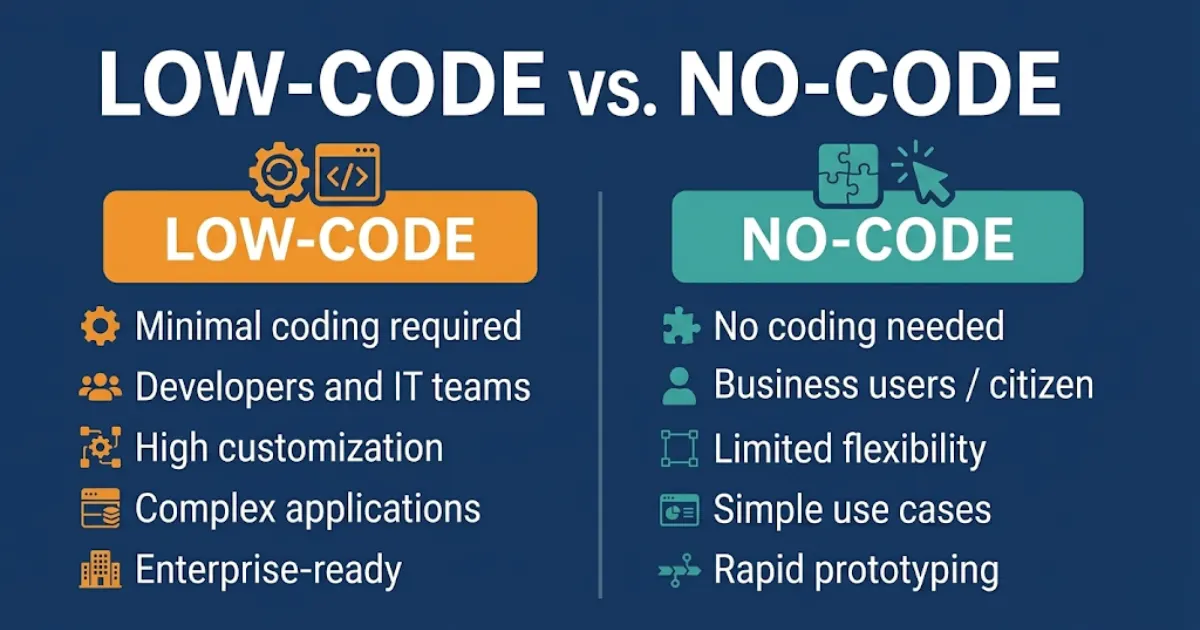
No-code platforms let non-technical users build applications, automations, and workflows using drag-and-drop interfaces with zero programming required. Low-code platforms provide the same visual interface but allow developers to extend functionality with custom code when the visual tools hit their limits. No-code is faster to start. Low-code is more powerful to scale. The right choice depends on who is building and what complexity the solution needs to handle.
You have a business problem that software could solve. Maybe it is a manual approval workflow that consumes three hours every week. Maybe it is a customer onboarding process that involves copying data between four systems. Maybe it is an internal tool your team needs that no off-the-shelf product quite covers.
You have two realistic options in 2026: hire a developer and wait six months, or build it yourself using a modern development platform that does not require you to write a line of code.
That is where the low-code vs no-code debate becomes genuinely important — not as a theoretical distinction, but as a practical decision that determines whether your business gets that solution in a week or a quarter, and whether it can grow without breaking.
This guide gives you the honest comparison: what low-code and no-code platforms actually are, where each one excels and fails, how to choose between them for your specific situation, and which platforms dominate each category in 2026.
What Is a No-Code Platform?
A no-code platform is a software development environment that allows users to build functional applications, automations, and workflows entirely through visual interfaces — drag-and-drop builders, pre-built components, and configuration menus — with no programming knowledge required.
The defining characteristic of a no-code tool is that the entire build process is abstracted from code. The user defines logic through visual rules, conditional settings, and template configurations. The platform generates the underlying code automatically, invisibly, without the user ever seeing it.
No-code platforms are designed for business users — operations managers, marketing teams, HR departments, and entrepreneurs — who have domain expertise but not engineering expertise. They empower these users to solve their own problems without waiting for a development team.
Common no-code use cases include:
- Internal forms and approval workflows
- Customer-facing portals and dashboards
- CRM customization and automation sequences
- Simple mobile and web app creation
- Data collection and reporting tools
- Marketing automation sequences and lead capture
- Basic AI chatbots and customer interaction flows
Quick Answer — What is a no-code platform?
A no-code platform is a visual development environment that allows non-technical users to build applications and automations without writing any code. Users configure logic, workflows, and interfaces through drag-and-drop tools and pre-built components. The platform handles all underlying code automatically. Popular examples include Bubble, Webflow, Airtable, Zapier, and Make.
What Is a Low-Code Platform?
A low-code platform provides the same visual, drag-and-drop development environment as a no-code tool — but with the critical addition that developers can insert custom code at any point in the build to extend functionality beyond what the visual interface supports.
The defining characteristic of a low-code tool is optionality. For simple use cases, the visual interface handles everything. When requirements exceed what pre-built components can deliver — complex business logic, custom API integrations, specialized UI components, performance optimization — a developer can write targeted code to fill the gap without rebuilding the entire application from scratch.
Low-code platforms are designed for professional developers and IT teams who need to move faster than traditional development allows, but who also need the flexibility to handle enterprise-grade complexity that no-code tools cannot.
Common low-code use cases include:
- Enterprise workflow and process automation
- Complex multi-system integrations with custom data transformation
- Customer-facing applications requiring custom business logic
- Legacy system modernization without full redevelopment
- AI-integrated business applications and agent frameworks
- Regulated industry applications requiring compliance-grade audit trails
- High-volume transactional systems with performance requirements
Low-Code vs No-Code: The Key Differences
| Factor | No-code | Low-code |
|---|---|---|
| Who builds it | Business users, non-technical teams | Developers, IT teams, technical analysts |
| Coding required | Zero — entirely visual | Optional — visual first, code when needed |
| Speed to first build | Hours to days | Days to weeks |
| Customization ceiling | Limited to platform components | Near-unlimited with custom code |
| Scalability | Limited at high volume or complexity | Scales to enterprise requirements |
| Integration depth | Pre-built connectors only | Native API + custom connectors |
| Maintenance | Simple — visual updates | Requires developer for code changes |
| Cost | Lower upfront and ongoing | Higher — developer time required |
| Security and compliance | Platform-level only | Customizable to enterprise standards |
| Best for | Simple to medium complexity, fast deployment | Medium to high complexity, long-term scale |
The most important thing to understand about the low-code vs no-code comparison is that it is not a quality distinction — it is a complexity-and-audience distinction. No-code platforms are not inferior versions of low-code platforms. They are designed for different builders solving different problems at different scales.
According to Gartner’s low-code development research, low-code application platforms will account for more than 65% of all application development activity by 2024, with no-code tools driving the largest share of new business application creation outside of IT departments.
When No-Code Is the Right Choice
No-code platforms win when the priority is speed, accessibility, and solving clearly defined problems within a known scope.
You need a solution in days, not months
No-code tools eliminate the development queue entirely. A marketing manager who needs a lead capture form connected to a CRM and an automated follow-up sequence can build, test, and deploy that workflow in an afternoon — without filing a ticket, attending a scoping meeting, or waiting for a sprint cycle. For businesses where operational speed is the competitive advantage, no-code is often the right first choice.
The builder is a domain expert, not a developer
The person who best understands the problem is often the best person to build the solution — and no-code platforms make that possible. An HR manager building an onboarding workflow knows the edge cases, the policy requirements, and the user experience nuances that a developer building from a requirements document will miss. No-code puts the build in the hands of the expert.
The use case is well-defined and unlikely to change dramatically
No-code platforms are the right choice when requirements are stable and complexity is bounded. An internal expense approval form. A customer feedback collection portal. A weekly report automation. These are problems with clear inputs, clear outputs, and low likelihood of requiring custom logic that breaks the platform’s visual constraints.
Budget is limited and speed of validation matters
No-code tools are significantly cheaper to operate than low-code platforms requiring developer time. For businesses validating whether an automated workflow delivers ROI before committing to a full development investment, no-code provides the proof of concept at a fraction of the cost.
When Low-Code Is the Right Choice
Low-code platforms win when the solution needs to scale, integrate deeply, handle complexity, or operate under enterprise-grade requirements.
The application will grow beyond initial requirements
Almost every successful internal tool eventually grows beyond its original scope. What starts as a simple approval workflow becomes a multi-department process management system. What starts as a basic customer portal becomes a full self-service platform. Low-code platforms handle this evolution through custom code extensions. No-code platforms hit their ceiling and require rebuilding from scratch — often at significant cost and disruption.
Complex integrations with proprietary or legacy systems
No-code platforms work well with mainstream SaaS tools through pre-built connectors. When your integration requirements involve legacy ERP systems, proprietary databases, non-standard APIs, or custom data transformation logic, you need the code-level access that only low-code platforms provide. Our n8n workflow automation service combines the visual workflow building of a no-code tool with the full code extensibility of a low-code platform — the architecture most suited to complex enterprise integration requirements.
Compliance, security, and data governance requirements
Regulated industries — healthcare, financial services, legal, insurance — have requirements that no-code platforms frequently cannot satisfy at the configuration level. Custom audit trail logic, field-level encryption, data residency controls, and role-based access models that go beyond platform defaults require code-level implementation. Low-code platforms provide the access to implement these requirements without rebuilding from scratch.
Performance at enterprise scale
No-code platforms are optimized for ease of use, not for performance under high transaction loads. When your application needs to process thousands of requests per hour, maintain sub-second response times, or handle complex queries across large datasets, the abstraction layers in no-code platforms create performance ceilings that low-code code-level optimization can overcome.
Best Low-Code and No-Code Platforms in 2026
Top no-code platforms
- Bubble — the most powerful no-code web application builder. Handles complex data models, user authentication, and multi-page applications that most no-code tools cannot approach. Best for founders and operators building product-grade web apps without engineering resources.
- Webflow — the leading no-code website and CMS platform. Design-first, production-grade, and deeply integrated with modern marketing stacks. Best for marketing teams and agencies building high-performance websites.
- Zapier — the dominant no-code automation platform for connecting SaaS tools. 7,000+ app integrations, intuitive trigger-action logic, and the most accessible entry point for business process automation. Best for simple to medium-complexity workflow automation.
- Airtable — no-code database and workflow platform that sits between a spreadsheet and an application. Best for operations teams managing structured data across departments without developer support.
- Make (formerly Integromat) — more powerful than Zapier for complex multi-step automations, with visual scenario building and advanced routing logic. Best for mid-market operations teams needing sophisticated automation without code.
Top low-code platforms
- n8n — the most developer-friendly low-code workflow automation platform. Self-hostable, fully extensible with custom JavaScript nodes, and ideal for building AI-integrated automation pipelines. Our n8n workflow automation service deploys this platform for businesses that need the flexibility of custom code inside a visual workflow builder.
- OutSystems — enterprise-grade low-code application development platform. Full lifecycle development with DevOps integration, compliance tooling, and performance optimization. Best for large enterprises building complex customer-facing applications.
- Microsoft Power Platform — Microsoft’s low-code suite combining Power Apps, Power Automate, Power BI, and Copilot Studio. Best for organizations standardized on the Microsoft stack.
- Appian — low-code process automation platform with strong case management and compliance capabilities. Best for regulated industries needing enterprise workflow orchestration.
- Retool — low-code internal tool builder connecting to any database or API. Significantly faster than custom development for building admin panels, dashboards, and internal operations tools. Best for developer teams that need to move fast on internal tooling.
Low-Code and No-Code AI Agents: The 2026 Frontier
The most significant development in both categories in 2026 is the convergence of low-code and no-code platforms with AI agent capabilities. Both platform types now allow businesses to build, deploy, and manage AI agents — autonomous systems that can reason, make decisions, and take actions across multiple tools — without requiring deep AI engineering expertise.
Our guide on how to build no-code AI agents for your business covers the full step-by-step process for deploying AI agents using no-code and low-code platforms — from choosing the right framework to connecting your agent to live business systems.
The practical distinction in AI agent development mirrors the broader low-code vs no-code split:
- No-code AI agents — platforms like Zapier, Make, and Go High Level now offer AI agent builders that allow non-technical users to create agents that handle customer enquiries, qualify leads, book appointments, and update CRM records — all configured through visual interfaces. Fast to build, bounded in complexity, ideal for well-defined customer interaction use cases.
- Low-code AI agents — platforms like n8n, combined with RAG-as-a-Service and custom LLM integrations, allow developers to build AI agents with custom reasoning logic, proprietary knowledge bases, multi-tool orchestration, and full observability into agent decision-making. More complex to build, dramatically more capable, and the right architecture for production-grade AI automation at enterprise scale.
For businesses building AI-powered customer service, sales automation, or internal knowledge management, the choice between no-code and low-code AI agent frameworks follows the same logic as the broader platform comparison: scope, complexity, integration requirements, and who is doing the building.
How to Choose Between Low-Code and No-Code
The decision framework is straightforward when you answer four questions honestly:
- Who will build and maintain it? If the builder has no coding background and no developer support, no-code is the only viable option. If a developer or technically capable analyst is involved, low-code opens significantly more capability.
- How complex is the integration requirement? Standard SaaS-to-SaaS connections → no-code handles it. Legacy systems, custom APIs, or complex data transformation → low-code is required.
- What does growth look like? If the application will remain simple and stable, no-code delivers better ROI. If the use case will grow in complexity and transaction volume, investing in low-code architecture from the start avoids a costly rebuild later.
- What are the compliance requirements? Standard business use without regulatory constraints → no-code is sufficient. Healthcare, finance, legal, or government contexts with specific data handling requirements → low-code provides the control that compliance demands.
The businesses that get the most value from both categories are those that use no-code for speed and experimentation — proving that a workflow delivers ROI before investing in a low-code build — and low-code for scale and permanence once the use case is validated.
For organizations that want expert guidance on which architecture fits their specific use case, the team at Exotica AI Solutions works with businesses across both platform categories — from rapid no-code deployment to full low-code enterprise automation architecture — building solutions that fit the problem rather than the other way around.
Frequently Asked Questions
The low-code vs no-code question does not have a single right answer — it has a right answer for your specific situation, team, use case, and growth trajectory.
The most effective approach in 2026 is not choosing one category and ignoring the other. It is understanding when each is appropriate: no-code for speed, validation, and empowering non-technical team members; low-code for scale, complexity, and building automation infrastructure that compounds in value over time.
The businesses generating the strongest operational leverage from automation in 2026 are those using both intelligently — matching the platform to the problem rather than forcing every problem through the same platform.
Start with the use case. Define the complexity. Identify the builder. Then choose the tool that fits all three.
Ready to build the right automation architecture for your business?
Talk to the Exotica AI Solutions team today.
Related Reading
- How to Build No-Code AI Agents for Your Business: Step-by-Step Guide
- n8n Workflow Automation Services
- Intelligent Automation Services
- RAG as a Service
- AI Chatbot Development
- Intelligent Automation Services: ROI, Use Cases & Getting Started

Mohit Thakur is an experienced Digital Marketing Expert, SEO Team Leader, and Content Writer with over 6 years of expertise in search engine optimization, content strategy, and digital growth. He specializes in research-driven SEO and crafting high-quality, compelling content that helps businesses improve their online visibility, organic traffic, and lead generation.
With hands-on experience across multiple industries, Mohit focuses on creating user-focused, well-researched content aligned with the latest Google algorithms and AI search trends. His approach combines technical SEO, content writing, content optimization, and data analysis to deliver consistent and measurable results.