Businesses today face increasing pressure to move faster while controlling operational costs. Many teams spend hours every week handling repetitive tasks such as answering customer questions, qualifying leads, processing internal reports, and managing marketing workflows. These manual processes slow down growth and prevent teams from focusing on strategic work.
Artificial intelligence is often seen as the solution, but traditional AI development requires technical expertise, large development budgets, and long implementation timelines. For many startups and growing companies, building custom AI systems from scratch is not practical.
This is where No-Code AI Agents are transforming modern business operations. Using visual AI tools and automation platforms, businesses can now create intelligent systems that automate tasks, interact with customers, and support decision-making without complex programming.
With the right strategy, companies can deploy AI agents across sales, marketing, customer support, and internal operations in a matter of days instead of months. This guide explains what no-code AI agents are, how they work, and how businesses can build them step by step.
What Are No-Code AI Agents?
No-Code AI Agents are intelligent automation systems that perform tasks, respond to requests, and interact with software platforms without requiring traditional coding.
Instead of writing complex programs, users create these agents using visual workflow builders and automation tools. These platforms combine artificial intelligence models with business integrations to automate tasks across different systems.
A typical no code AI agent can:
- Understand natural language questions
- Automate repetitive business workflows
- Connect with CRM and marketing tools
- Process customer support requests
- Qualify sales leads automatically
- Generate reports and insights
Because these agents rely on low code and no code platforms, non-technical teams can design automation workflows without needing software development expertise.
Many businesses use tools such as Zapier, Flowise, LangChain integrations, and automation platforms to build intelligent workflows that function as AI agents.
As adoption grows, companies are using no code platforms for building AI agents to accelerate digital transformation and improve operational efficiency.
Why Businesses Are Using No-Code AI Agents
Organizations across industries are adopting no code AI agent automation because it helps them streamline operations and reduce manual work.
Faster Implementation
Traditional AI development often requires months of engineering work. A no code visual AI agent builder allows teams to create automation workflows within days.
Lower Costs
Companies no longer need to hire large AI engineering teams to build intelligent automation systems.
Improved Productivity
AI agents can manage repetitive tasks such as responding to inquiries, routing requests, or generating reports.
Scalable Automation
Once deployed, AI agents can handle thousands of interactions simultaneously, allowing businesses to scale operations without increasing headcount.
Cross-Department Automation
Businesses can build no code AI agents for sales, marketing, and operations, creating automation across the entire organization.
Business Use Cases for No-Code AI Agents
One of the biggest advantages of no-code AI agents is their flexibility. They can automate a wide range of operational processes across departments.
Customer Support AI Agent
Customer service teams often spend significant time responding to common questions.
A customer support AI agent can:
- Answer frequently asked questions
- Route complex issues to support teams
- Categorize support tickets
- Provide instant responses to customers
This reduces support workloads and improves response times.
Lead Qualification AI Agent
Sales teams frequently receive large numbers of inquiries that require manual review.
A lead qualification AI agent can:
- Analyze incoming leads
- Categorize prospects by intent
- Collect additional information from customers
- Send qualified leads directly to the sales team
This allows sales teams to focus on high-value opportunities.
Marketing Automation AI Agent
Marketing teams can use AI agents to automate campaign processes and communication workflows.
Examples include:
- Generating marketing content
- Segmenting customer audiences
- Sending automated email follow-ups
- Tracking campaign performance
These systems support marketing teams while improving campaign efficiency.
Operations and Reporting Agent
Operational teams often spend time generating reports and managing internal processes.
An operations AI agent can:
- Collect and analyze business data
- Generate reports automatically
- Monitor workflow performance
- Trigger alerts or approvals
This improves internal efficiency and decision-making.
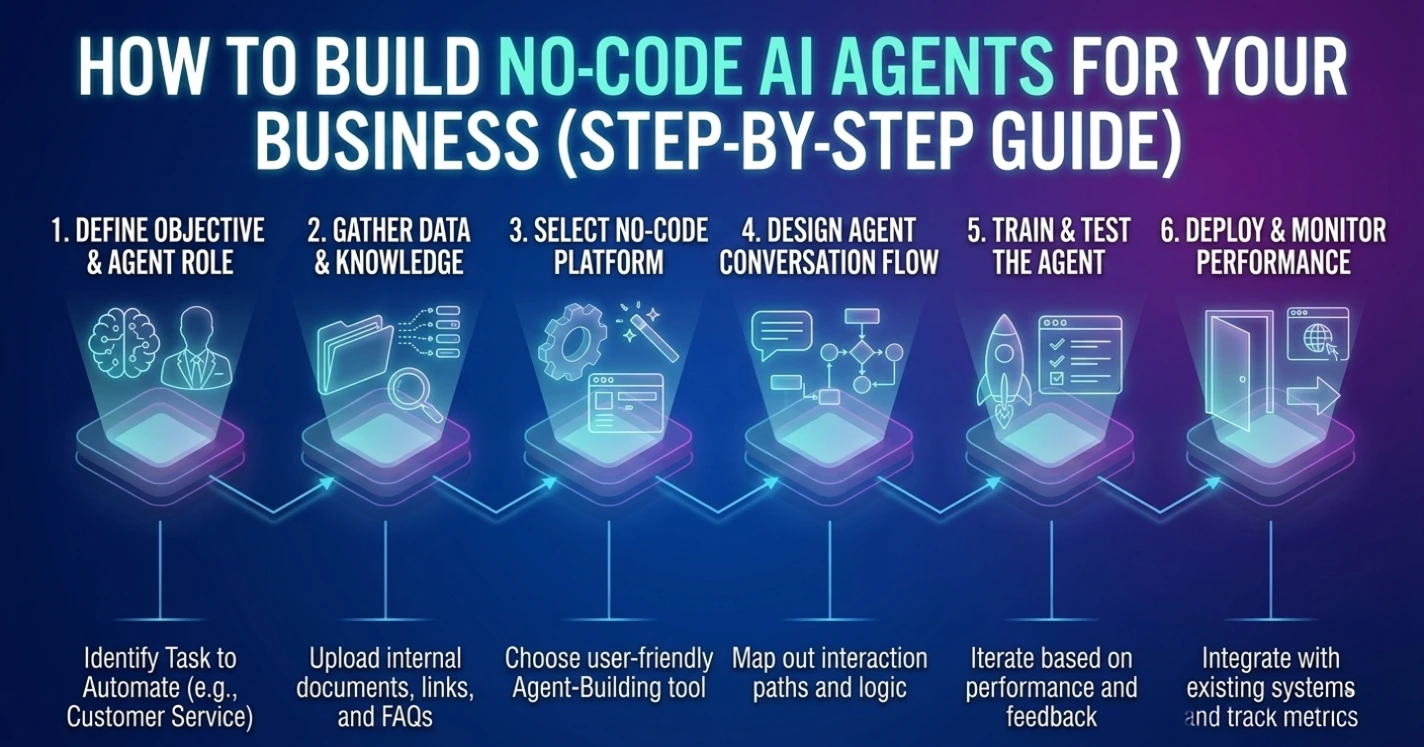
Step-by-Step: How to Build a No-Code AI Agent
Businesses can follow a simple framework when creating AI automation systems.
Step 1: Define the Task
Start by identifying a business process that can be automated. Common examples include customer inquiries, lead management, or internal reporting.
Automation works best when applied to repetitive and predictable workflows.
Step 2: Choose a No-Code AI Agent Builder
Next, select a no code AI agent builder that supports automation workflows and AI integrations.
Features to look for include:
- Visual workflow design
- API integrations
- AI model compatibility
- CRM and SaaS connectivity
- Automation triggers
Some businesses also use tools such as n8n as a no code AI agent builder for workflow automation.
Step 3: Connect Data and APIs
AI agents often rely on multiple data sources. Integrating business tools allows the system to access relevant information.
Typical integrations include:
- CRM platforms
- Marketing automation tools
- Support ticketing systems
- Internal databases
- Analytics platforms
These integrations allow the AI agent to trigger actions and update records automatically.
Step 4: Train the Agent
Some agents require contextual knowledge to respond effectively.
Training data may include:
- Company documentation
- Product information
- Frequently asked questions
- Internal processes
This training helps the agent understand business context and provide accurate responses.
Step 5: Deploy and Monitor
Once the workflow is ready, businesses can deploy the AI agent within their systems.
Monitoring performance helps ensure the automation works reliably and delivers accurate results.
Continuous improvements allow the agent to become more efficient over time.
Common Challenges Businesses Face
Integration Complexity
Businesses often use multiple software platforms that must work together. Connecting these systems requires careful workflow design.
Data Quality
AI agents rely on accurate data sources. Poor data can lead to incorrect responses or automation errors.
AI Reliability
AI models can occasionally produce inaccurate responses. Businesses must implement monitoring and review processes.
Workflow Design
Automation workflows can become complex when multiple systems and triggers are involved.
For many companies, working with an experienced AI automation partner can simplify implementation and ensure reliable results.
Organizations implementing intelligent automation solutions with providers such as Exotica AI Solutions often benefit from structured workflows, integration expertise, and scalable automation strategies.
The Future of No-Code AI Agents
The adoption of AI automation is accelerating as businesses search for ways to improve efficiency and reduce operational costs.
Emerging developments include:
- Autonomous multi-agent systems
- Advanced workflow orchestration
- Deeper SaaS integrations
- Industry-specific automation templates
As technology evolves, the ability to build a no code AI agent will become a core digital capability for modern organizations.
Companies that adopt AI automation early will gain a competitive advantage by transforming manual workflows into intelligent systems.
Pillar and Cluster Strategy for Topical Authority
Main Pillar Page
No-Code AI Agents: Complete Guide for Businesses
Supporting Cluster Articles
- What Are AI Agents and How Do They Work
- Best No Code AI Agent Builder Platforms
- AI Agents for Customer Support Automation
- AI Agents for Sales and Lead Generation
- AI Automation for Business Operations
- Low Code vs No Code AI Development
Each cluster article should link back to the pillar page to strengthen search visibility and topical relevance.
Frequently Asked Questions
Conclusion
No-code AI agents are redefining how businesses adopt artificial intelligence. By removing the complexity of traditional development, companies can deploy intelligent automation systems that streamline workflows, improve productivity, and reduce operational costs.
From customer support and lead qualification to marketing automation and internal operations, AI agents can transform how organizations operate. Businesses that adopt no code AI agents early will gain a significant advantage by automating repetitive processes and improving efficiency across their operations.
With the right strategy and automation tools, organizations can build scalable AI systems that support growth and innovation. Companies implementing AI automation frameworks with partners such as Exotica AI Solutions are already using intelligent agents to create more efficient and scalable business operations.

Mohit Thakur is an experienced Digital Marketing Expert, SEO Team Leader, and Content Writer with over 6 years of expertise in search engine optimization, content strategy, and digital growth. He specializes in research-driven SEO and crafting high-quality, compelling content that helps businesses improve their online visibility, organic traffic, and lead generation.
With hands-on experience across multiple industries, Mohit focuses on creating user-focused, well-researched content aligned with the latest Google algorithms and AI search trends. His approach combines technical SEO, content writing, content optimization, and data analysis to deliver consistent and measurable results.