What are the most powerful workflows you can build with n8n?
The n8n automation platform enables businesses to build complex, AI-integrated workflows that connect virtually any app, database, or API — from automated lead capture and CRM sync to AI-powered customer support, invoice processing, and real-time KPI reporting. Unlike task-limited platforms, n8n runs unlimited workflows on self-hosted infrastructure, making it the most cost-effective choice for high-volume automation.
You are spending hours on tasks that should take minutes. Leads fall through the cracks because your CRM does not talk to your email tool. Invoices sit in inboxes waiting for someone to manually copy numbers into a spreadsheet. Reports do not get generated until someone remembers to run them.
That is exactly the problem the n8n automation platform was built to solve. Unlike consumer-grade tools that hide logic behind rigid templates, n8n gives you a fully programmable, open-source workflow engine that connects virtually any app, database, or API — visually, without writing hundreds of lines of code.
In this guide, we walk through the 10 most impactful workflows businesses are building with n8n right now — covering everything from AI-powered customer pipelines to fully automated financial reporting. Each workflow includes the context for why it matters, the tools involved, and what the automation actually does day-to-day.
What Makes the n8n Workflow Automation Platform Different?
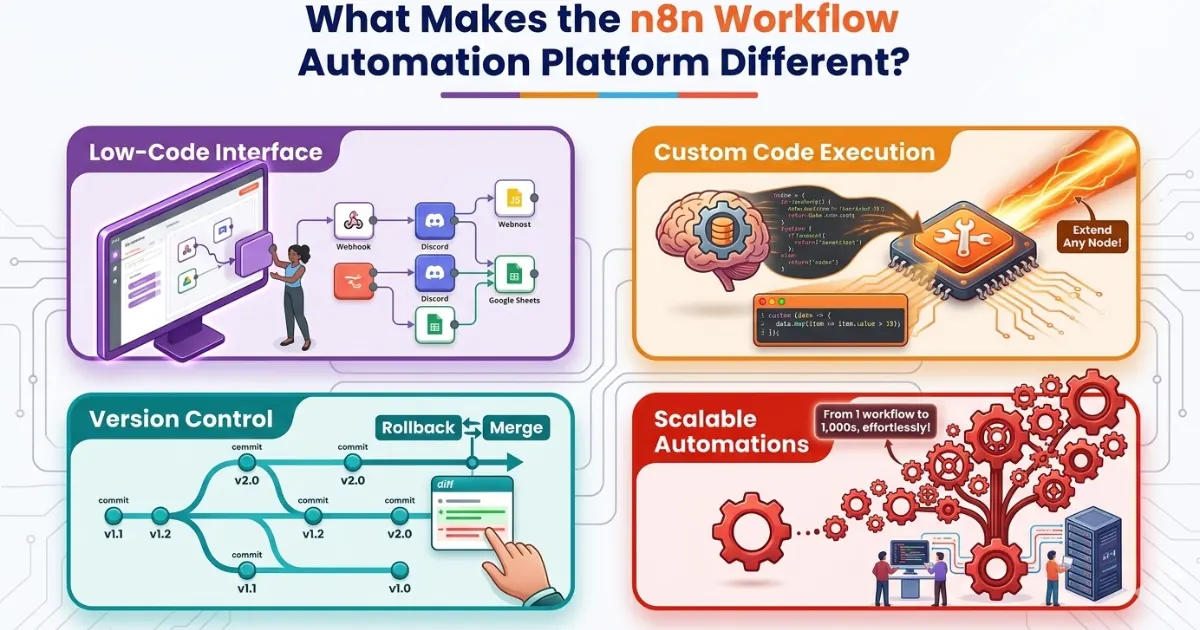
Before diving into the workflows, it is worth understanding why so many businesses are choosing n8n over alternatives like Zapier, Make, or Microsoft Power Automate.
The core difference comes down to control and cost at scale. n8n is open-source, meaning you can self-host it on your own infrastructure — eliminating the per-task pricing that makes other platforms expensive as your automation volume grows. At the same time, n8n’s node-based visual editor handles complex conditional logic, loops, and multi-branch workflows that simpler tools cannot.
| Capability | n8n | Zapier | Make |
|---|---|---|---|
| Self-hosting option | ✓ Yes — full data sovereignty | ✗ Cloud only | ✗ Cloud only |
| Custom code nodes | ✓ JavaScript and Python | Limited | Limited |
| JSON workflow import | ✓ Native | ✗ No | Partial |
| Pricing model | Free (self-hosted) / usage-based | Per task / month | Per operation |
| AI and LLM node support | ✓ Native LangChain nodes | Via Zapier AI (limited) | Limited |
| Execution limits | Unlimited (self-hosted) | Task-based — escalates at volume | Operation-based |
For a detailed platform comparison including real cost savings at scale, see our in-depth analysis: n8n vs Zapier for Hyperautomation: Which Platform Saves More Money in 2026?
Workflow 1 — Automated Lead Capture, Enrichment and CRM Sync
Tools: Typeform / HubSpot form · Clearbit or Hunter.io · Salesforce / Pipedrive / HubSpot CRM · Slack
This is one of the most impactful n8n workflows for any sales-driven organization. The workflow triggers when a new lead fills out a form, automatically enriches the contact data using Clearbit or Hunter.io, scores the lead based on defined criteria, then creates or updates a record in your CRM — all without a single manual step.
How it works step by step:
- Webhook or form submission trigger fires when a new lead submits
- HTTP request node calls Clearbit API to enrich contact with company size, industry, and LinkedIn data
- IF node scores the lead based on enrichment criteria — company size, title, industry match
- High-score leads are created in CRM as high-priority deals with full enrichment data
- Slack notification fires to the assigned rep with lead summary and direct CRM link
- Low-score leads are added to a nurture sequence in your email platform automatically
Teams using this workflow report cutting lead response time from hours to under two minutes. Combined with our CRM integration service, this workflow becomes the foundation of a fully automated sales operations layer.
Workflow 2 — AI-Powered Customer Support Triage and Auto-Response
Tools: Zendesk / Intercom / email · GPT-4 or Claude via LangChain node · Knowledge base (Notion, Confluence) · Slack
Using n8n’s native LangChain nodes, you can build a workflow that listens for new support tickets, classifies intent using an LLM, searches your knowledge base for a relevant answer, and either responds automatically for low-complexity queries or routes urgent tickets to the right agent with a pre-drafted response.
This workflow connects directly to AI chatbot infrastructure for businesses that want a fully autonomous first-response layer. The LLM node reads the ticket content, determines urgency and category, retrieves the most relevant knowledge base article, and generates a personalized response — all within seconds of ticket submission.
Organizations deploying this workflow consistently deflect 30–40% of tier-1 support volume without human intervention, while improving response time from hours to under a minute.
Workflow 3 — End-to-End E-Commerce Order and Fulfillment Automation
Tools: Shopify / WooCommerce · ShipStation / EasyPost · QuickBooks / Xero · Customer email
Connect your e-commerce platform to your warehouse management system, shipping provider, and accounting software in a single workflow. When an order is placed, n8n triggers fulfillment, generates the invoice, notifies the customer with tracking details, and logs the transaction — all within seconds of checkout.
How it works:
- Shopify webhook triggers on new order placement
- Inventory check node verifies stock availability
- ShipStation node creates shipment and retrieves tracking number
- Customer confirmation email sent with order summary and tracking link
- QuickBooks node creates invoice and logs the transaction
- Low-stock alert fires to operations Slack channel if inventory drops below threshold
This is one of the most widely deployed n8n workflow templates in e-commerce operations. High-volume retailers processing thousands of orders daily report this single workflow eliminating the equivalent of one full-time operations role in manual processing time.
Workflow 4 — AI-Assisted Blog Research and Content Publishing Pipeline
Tools: Google Trends API / RSS feeds · GPT-4 LangChain node · Notion / Google Docs · WordPress / Ghost · Buffer / social APIs
One of the most valuable use cases for content and marketing teams using n8n workflows is an end-to-end content pipeline. n8n pulls trending topics via the Google Trends API or RSS feeds, uses an LLM to draft content briefs or first-pass articles, pushes the draft to Notion or Google Docs for review, and then — once approved — auto-publishes to WordPress while simultaneously scheduling social posts across LinkedIn, X, and Facebook.
For businesses building topical authority through consistent content — like the strategy behind this entire Exotica AI Solutions blog — this workflow dramatically increases content velocity without adding headcount. Marketing teams report 3–5x more content output with no additional staff using this automation.
Workflow 5 — Employee Onboarding and Provisioning Automation
Tools: BambooHR / Workday · Google Workspace / Microsoft 365 · Asana / Monday.com · Slack · Email
HR and IT teams lose significant time to manual onboarding tasks. With n8n, a new hire record in your HRIS triggers a multi-step workflow: creates accounts in Google Workspace or Microsoft 365, sends a personalized welcome email sequence, assigns tasks in Asana or Monday.com, provisions access to required SaaS tools, and schedules a day-one calendar block.
A process that previously took a full day of back-and-forth now completes in minutes. For organizations with high hiring velocity — particularly those using intelligent automation services across HR and operations — this workflow is typically one of the fastest-payback automations in the entire program.
Workflow 6 — Automated Invoice Processing and Approval Routing
Tools: Gmail / Google Drive · PDF parser / AI extraction node · QuickBooks / Xero · Slack · Email
n8n monitors a dedicated email inbox or Google Drive folder for incoming invoices. Using an AI extraction node or PDF parser, it pulls key data — vendor, amount, due date — creates a record in your accounting system, routes the invoice to the appropriate approver via Slack or email based on amount thresholds, and upon approval schedules the payment.
- Invoices under $500 → auto-approved and posted to accounting system
- Invoices $500–$5,000 → routed to department manager via Slack with one-click approval
- Invoices over $5,000 → routed to finance director with full vendor history attached
- Overdue reminders → automatically sent at configurable intervals
Finance teams reduce invoice cycle times from weeks to days with this workflow. The AI extraction node handles variable-format invoices that rule-based PDF parsers miss — a direct application of the RAG and AI document processing capability at the core of intelligent automation.
Workflow 7 — Developer Alert Management and Incident Routing
Tools: Datadog / PagerDuty / Sentry · Slack · Jira · Runbook documentation
Engineering teams rely on real-time alerting, but alert fatigue is real. An n8n workflow sits between your monitoring tools and your communication channels. It filters noise using severity rules, enriches alerts with context from your documentation or runbooks, routes critical incidents to on-call engineers, and logs everything into your incident tracker.
How it works:
- Datadog webhook fires on new alert
- Severity classification node filters low-priority noise
- LLM node queries internal runbook knowledge base for context and recommended first steps
- High-severity alerts: Slack page to on-call engineer with runbook context pre-attached
- Jira node creates incident ticket automatically with all alert data
- Resolution confirmation closes the Jira ticket and logs response time
Mean time to response drops significantly when the right person gets the right alert with the right context — automatically. For teams building AI-integrated DevOps pipelines, this workflow is a practical implementation of the intelligent automation architecture described in our services guide.
Workflow 8 — Multi-Channel Social Media Scheduling and Content Repurposing
Tools: WordPress / Ghost RSS · GPT-4 LangChain node · Buffer / LinkedIn API / X API / Facebook API
One piece of long-form content can fuel an entire month of social posts. n8n automates this by pulling a published blog post or video transcript, using an AI node to generate platform-specific variations — LinkedIn thought-leadership post, X thread, Instagram caption — then queuing each post in Buffer or directly via social APIs on a defined schedule.
This workflow is particularly powerful for businesses building content-driven topical authority. Every blog post automatically generates a full social distribution sequence without any manual effort. Marketing teams using this workflow report 3–5x more social output with the same team size.
Workflow 9 — Customer Health Scoring and Churn Risk Alerts
Tools: Product analytics platform · Support ticketing system · Stripe / billing platform · NPS tool · Slack / email CRM
For SaaS and subscription businesses, identifying at-risk customers before they churn is the difference between a good and a great retention rate. n8n aggregates product usage data, support ticket frequency, NPS scores, and billing signals on a daily schedule, computes a composite health score, and triggers personalized outreach sequences when a customer drops below a defined threshold.
| Health score range | Automated action | Channel |
|---|---|---|
| 80–100 (Healthy) | Expansion opportunity alert to CSM | Slack |
| 50–79 (At risk) | Automated check-in email + CSM task created | Email + CRM task |
| Below 50 (Critical) | Immediate CSM Slack alert + escalation email sequence | Slack + Email |
| Payment failed | Dunning sequence triggered + account flag in CRM | Email + CRM |
Your customer success team stops chasing data and starts having the right conversations. This workflow directly supports the CRM integration architecture that connects customer health signals to your sales and success operations.
Workflow 10 — Automated KPI Dashboards and Stakeholder Reporting
Tools: Google Analytics · Stripe · Salesforce / HubSpot · PostgreSQL / database · Slack / email · GPT-4 for narrative
Manually assembling a weekly business report is one of the most tedious recurring tasks in any organization. n8n runs on a cron schedule, pulls KPI data from multiple sources, formats the results into a structured report, generates an AI-written narrative summary, and emails or posts the finished report to Slack — all before your team sits down on Monday morning.
How it works:
- Cron trigger fires every Monday at 6:00 AM
- Parallel data pull nodes query Google Analytics, Stripe, Salesforce, and database simultaneously
- Data transformation node calculates week-over-week and month-over-month changes
- LLM node generates a plain-English narrative summary with highlights and anomalies
- Report formatted as structured email and posted to #operations Slack channel
- PDF version saved to Google Drive for audit records
This is consistently one of the most appreciated n8n workflow templates for operations and executive teams — because the value is immediately visible every Monday morning without anyone having to ask for it.
Working with n8n Workflow Templates and JSON Import
One of n8n’s most practical features for teams managing multiple environments is native support for workflow portability. Every workflow you build can be exported as a structured n8n workflow JSON schema, versioned in Git, and re-imported into any n8n instance with zero reconfiguration of the logic.
How to import a workflow JSON in n8n
To import a workflow JSON file into your n8n instance: navigate to the Workflows menu, click “Import from File,” and select your exported `.json` file. You can also paste the raw JSON directly using Ctrl+V. Once imported, reconnect any credentials (API keys, OAuth tokens) and the workflow is ready to activate.
The official n8n community template library contains hundreds of pre-built workflow templates for popular apps including Slack, Google Sheets, Notion, Airtable, Stripe, and more. For teams building custom templates, understanding the n8n workflow JSON schema allows you to programmatically generate or modify workflows using scripts — a powerful option for agencies managing automation infrastructure for multiple clients.
Pro tip: Before rebuilding a workflow from scratch, check the n8n community template library at n8n.io/workflows. Many of the most common automation patterns — including all 10 listed above — have starter templates you can import and customize in minutes. This is one of the fastest ways to prove the ROI of the n8n automation platform before investing in custom development.
How to Decide Where to Start with n8n Automation
The biggest mistake businesses make when adopting a workflow automation platform is trying to automate everything at once. A more effective approach is to identify your highest-friction, highest-frequency manual processes first.
Ask yourself: what task does my team do repeatedly every day that does not require human judgment? That is your first automation candidate. Lead routing, invoice processing, and report generation consistently rank highest in ROI surveys — and all three are covered in the workflow list above.
For businesses evaluating n8n alternatives automation platforms, it is also worth understanding total cost of ownership. n8n’s self-hosted model means automation costs do not scale linearly with usage volume — a major advantage as workflows mature and run thousands of executions per day. Our detailed guide on n8n vs Zapier for hyperautomation breaks down real cost scenarios across business sizes.
For businesses comparing n8n automation platform comparison options more broadly — including Make, Microsoft Power Automate, and other n8n alternatives workflow automation platforms — our best business process automation tools guide covers the full market landscape with honest evaluation criteria.
The team at Exotica AI Solutions has helped businesses scope, build, and maintain n8n automation environments — from initial workflow design to full production deployment with monitoring and error handling built in. The operational value of getting the architecture right from the start pays dividends for years.
Frequently Asked Questions
The n8n automation platform is not just a workflow tool — it is a competitive infrastructure decision. Businesses that invest in automating their highest-friction processes today are building an operational advantage that compounds over time. Whether you start with a simple lead sync or a full AI-powered support triage system, the goal is the same: less manual overhead, faster execution, and a team that spends time on work that actually requires their judgment.
The 10 workflows covered in this guide represent the most impactful starting points across sales, marketing, operations, finance, HR, and engineering. Each one can be built with n8n’s visual editor, leverages tools you already use, and can be version-controlled as a JSON schema for easy deployment and sharing.
Start with one workflow. Measure the time savings. Expand from there. The ROI typically speaks for itself within the first month.
Ready to build automation that scales with your business?
Talk to the Exotica AI Solutions team today.
Related Reading
- n8n Workflow Automation Services
- n8n vs Zapier for Hyperautomation: Which Platform Saves More Money in 2026?
- n8n Workflow Automation: How Smart Businesses Are Saving 20+ Hours a Week
- Intelligent Automation Services: ROI, Use Cases & Getting Started
- Best Business Process Automation Tools in 2026
- Workflow Automation Services

Mohit Thakur is an experienced Digital Marketing Expert, SEO Team Leader, and Content Writer with over 6 years of expertise in search engine optimization, content strategy, and digital growth. He specializes in research-driven SEO and crafting high-quality, compelling content that helps businesses improve their online visibility, organic traffic, and lead generation.
With hands-on experience across multiple industries, Mohit focuses on creating user-focused, well-researched content aligned with the latest Google algorithms and AI search trends. His approach combines technical SEO, content writing, content optimization, and data analysis to deliver consistent and measurable results.