What Are AI Automation Consulting Services?
AI automation consulting services help businesses identify which workflows waste the most time, then build AI-powered systems to handle them without manual input. A consultant maps your current process, picks the right tools, connects them to your existing software, and trains your team to maintain what’s built. The result is a working automation — not a demo — that runs daily and produces measurable results. For Canadian and US small and mid-sized businesses, this typically means reducing hours spent on repetitive tasks like data entry, lead follow-up, document processing, and customer support triage by 40–70% within the first few months.
Key Takeaways
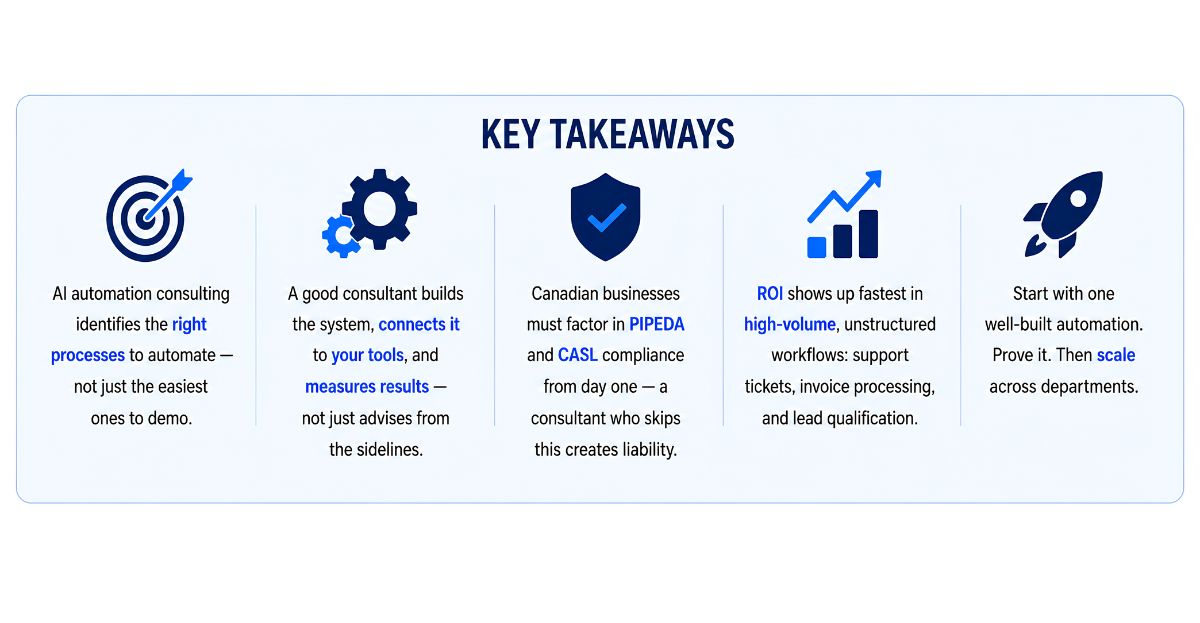
- AI automation consulting identifies the right processes to automate — not just the easiest ones to demo.
- A good consultant builds the system, connects it to your tools, and measures results — not just advises from the sidelines.
- Canadian businesses must factor in PIPEDA and CASL compliance from day one — a consultant who skips this creates liability.
- ROI shows up fastest in high-volume, unstructured workflows: support tickets, invoice processing, and lead qualification.
- Start with one well-built automation. Prove it. Then scale across departments.
Most businesses don’t have an AI problem. They have a workflow problem. The AI tools are sitting right there — ChatGPT, Make, Zapier, n8n — and someone on the team has probably already tried a few of them. But nothing is connected. Nothing runs on its own. And the manual handoffs are still eating hours every day.
That’s the gap AI automation consulting services are built to close. Not more tools. Not another pilot. A working system, connected to what you already use, that handles the volume without a person in the middle.
At Exotica IT Solutions, we build these systems for SMBs across Canada and the US. This guide covers exactly what you should expect from a consulting engagement, what it costs, and how to tell a real implementation partner from someone who just sells advice.
What AI Automation Consulting Actually Delivers — Beyond the Pitch Deck
There’s a version of AI consulting that ends with a 40-slide deck and a list of tools to consider. That’s not what moves the needle. Real AI automation consulting ends with a system running in your actual environment, touching your real data, producing results you can measure in hours saved or errors caught.
Here’s what a genuine engagement covers:
- ▸Process audit. Map every workflow that costs your team more than 5 hours a week. Flag which ones have messy, unstructured input — those are the highest-value automation targets.
- ▸Tool selection. Match the right AI model and platform to each task. Not every workflow needs GPT-4. Some only need a classifier. A consultant who recommends the same stack for every client isn’t consulting — they’re reselling.
- ▸Build and integration. Connect the AI layer to your existing CRM, inbox, helpdesk, or ERP. The system fires when the trigger hits and delivers the output where it’s needed — no manual step in between.
- ▸Compliance review. Every automation that touches customer data in Canada needs a PIPEDA and CASL check built in before go-live — not treated as an afterthought.
- ▸Training and handoff. Your team should understand what the system does and how to flag a problem. A black-box automation nobody understands will get turned off the first time something goes sideways.
According to McKinsey’s 2025 State of AI report, 88% of organizations now use AI in at least one function — but only 6% qualify as high performers actually seeing profit impact. The gap is implementation quality, not tool access. That’s exactly what a consulting partner is supposed to fix.
Did You Know
Gartner projects that by 2028, at least 15% of everyday business decisions will be handled autonomously by agentic AI systems. Businesses that start building structured AI automation workflows now will already be operating those systems at scale when that shift arrives.
Business Process Automation vs Intelligent Automation vs AI Consulting — Which Do You Need?
These terms get used interchangeably. They shouldn’t. The difference determines whether you’re buying the right solution for your actual problem.
| Service Type | What It Does | Best Fit |
|---|---|---|
| Business Process Automation (BPA) | Automates fixed, rule-based steps | Invoicing, approvals, onboarding |
| Intelligent Automation | Combines RPA with AI models | Document processing, claims |
| AI Automation Consulting | Designs, builds, and integrates end-to-end AI workflows | Support, sales ops, content, lead handling |
| Agentic AI Systems | AI decides the next step autonomously | Multi-step research, complex decision chains |
For most SMBs in Canada and the US, AI automation consulting is the right entry point. It gives you AI-powered judgment inside structured workflows — without the unpredictability of fully autonomous agentic systems. Our Intelligent Automation Services page covers how this plays out in practice for businesses at different stages of adoption.
How AI Automation Consulting Works — Step by Step
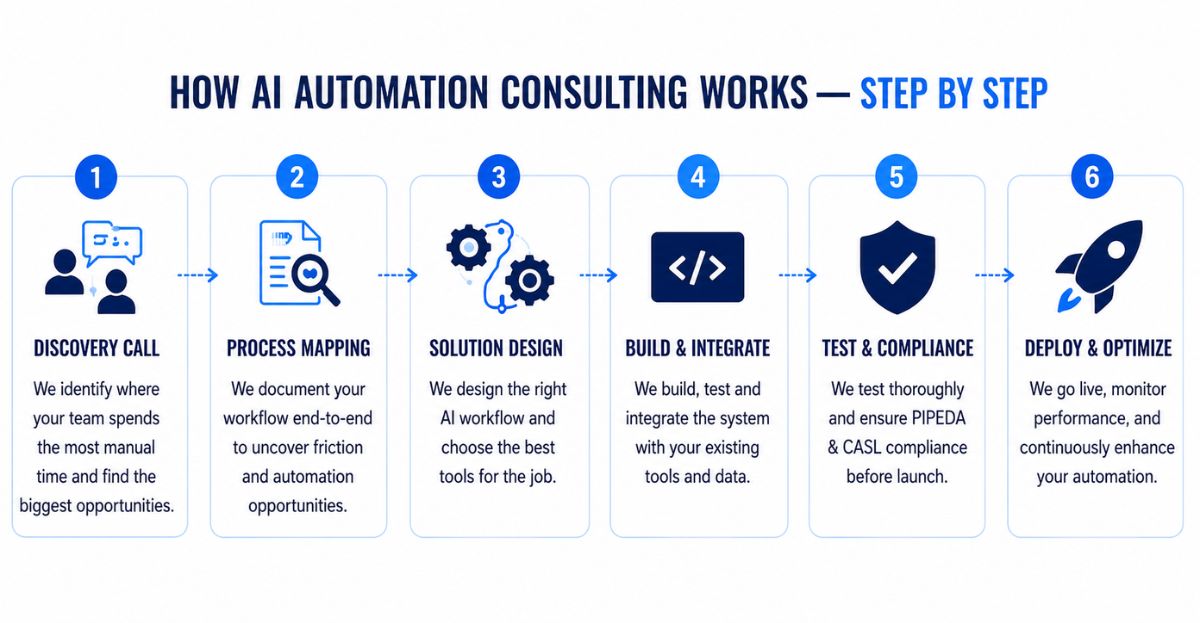
A proper consulting engagement follows a clear sequence. No shortcuts. Here’s how it runs from first call to live system.
- ▸Step 1 — Discovery call. The consultant asks where your team spends the most manual time. Not what AI tools you’ve heard of. Where the actual hours go. That conversation identifies two or three high-value candidates right away.
- ▸Step 2 — Process mapping. The team documents the current workflow in full: trigger, steps, decision points, output, and where it lands. This is where you find the friction — usually a messy input format or a manual data transfer step nobody thought to question.
- ▸Step 3 — Architecture design. The consultant picks the automation platform, selects the AI model for each task, and maps out how data flows between systems. This is where tool and model choices get made — and explained, not just decided.
- ▸Step 4 — Build and test. The automation gets built, tested with real data from your environment, and refined before anything goes live. Edge cases get handled here — not after a real customer is affected.
- ▸Step 5 — Launch with a human checkpoint. Any automation that touches customers, payments, or external communications gets a review step first. The automation prepares the action. A person approves it. That review gate shrinks as confidence builds.
- ▸Step 6 — Monitor and report. Weekly error rate checks and usage reviews for the first 60 days. AI model behaviour can shift without warning. You need numbers, not feelings, to catch it early.
Real-World Example: Vancouver-Based Property Management Company
A property management firm in Vancouver was spending roughly 12 hours a week routing tenant maintenance requests — reading emails, categorizing by urgency, assigning to the right contractor, and following up manually when no response came.
After an AI automation consulting engagement, the same process runs end to end in under three minutes per request. The AI reads each message, classifies urgency, assigns the appropriate contractor from a live availability list, sends a confirmation to the tenant, and flags anything unusual for human review. Response time dropped from 18 hours average to under 2. The team’s manual involvement now sits at roughly 15 minutes per day for edge cases only.
Get Your Automation Built by Exotica IT Solutions
Key Factors to Evaluate Before Hiring an AI Automation Consultant
1. Do They Build or Just Advise?
Ask directly: will your team build and deploy the automation, or will you hand off a recommendations document? Strategy without execution is expensive and slow. The firms that move the needle are the ones who stay involved through go-live and the first 30 days of monitoring.
2. Do They Understand Your Tech Stack?
An AI automation that can’t connect to your CRM or accounting software is useless. Your consultant needs to have worked with the tools you already use — or be honest about where custom integration work is required. Our CRM Setup and Integration service shows how this works in practice when AI automation needs to feed directly into your sales pipeline.
3. Canadian Compliance Knowledge
If customer data runs through the automation — and it almost always does — your consultant needs to understand PIPEDA requirements and CASL consent rules. Quebec businesses also face Law 25 obligations. These aren’t optional — and fixing a non-compliant system after launch costs far more than building it right the first time.
4. Can They Show Results From Similar Businesses?
Ask for examples from businesses at roughly your size in a similar industry. Not logos. Actual outcomes — hours saved, error rates dropped, cost per task before and after. If they can’t produce that, keep looking.
5. Post-Launch Support
AI models update. APIs change. Workflows break in subtle ways. A consulting partner who disappears after delivery leaves you with a system nobody on your team knows how to fix. Make sure ongoing monitoring and support is part of the agreement from the start.
AI Automation Consulting Cost and Timeline for Canadian and US Businesses
Pricing varies by how many systems you’re connecting and how custom the logic needs to be. Here’s what a realistic engagement looks like for SMBs across Canada and the United States.
| Engagement Type | What’s Included | Typical Timeline |
|---|---|---|
| AI Audit + Strategy | Process review, automation roadmap, tool recommendations | 1–2 weeks |
| Single Workflow Build | One end-to-end automation: trigger → AI → action, with testing | 2–4 weeks |
| Connected System (2–3 workflows) | Multiple automations, shared data layer, human review steps | 4–8 weeks |
| Multi-Department Rollout | Sales, support, and ops workflows with monitoring and governance | 2–4 months |
What the Numbers Show
According to IBM’s 2024 Global AI Adoption Index, organizations running autonomous AI workflows cut manual processing costs by close to 40% within the first year. A separate McKinsey analysis found that AI-enabled businesses reported 3.5 times greater revenue growth than peers who hadn’t deployed structured AI workflows. For Canadian SMBs, those numbers translate to concrete savings on the operational costs that eat margin every quarter.
Before any engagement starts, track how many hours your team spends on the target process per week. That’s your baseline. Everything after that is provable ROI — or proof it’s time to adjust the approach.
Common Mistakes Businesses Make When Hiring AI Automation Consultants
- ▸Prioritizing tools over outcomes. “We want to use GPT-4” is not a business requirement. Start with the problem — what’s costing you the most time — and let that drive the tool choice.
- ▸Skipping the data cleanup step. Duplicate CRM records and inconsistent field formats don’t get fixed by automation. They get amplified. Clean the data before the AI touches it.
- ▸Hiring a generalist agency for a specialist job. AI workflow automation requires knowledge of LLM behaviour, API integrations, and data architecture — not just project management. Verify that the people building are not the people selling.
- ▸No success metrics defined upfront. If you can’t define what “working” looks like in measurable terms before you start — hours saved, tickets resolved, error rate reduced — you won’t know if you got there.
- ▸Ignoring compliance from the start. Any automation processing personal data for Canadian customers must align with PIPEDA. Outbound messaging needs CASL consent. Building around this after the fact is expensive and sometimes impossible without starting over.
- ▸Treating the launch as the finish line. AI model behaviour drifts. APIs update silently. Usage patterns shift. The businesses that sustain results past 90 days are the ones monitoring actively — not the ones who assumed it would just keep working.
Frequently Asked Questions: AI Automation Consulting Services
The businesses that get real results from AI automation share one thing in common: they picked the right first process, built it properly, and measured what changed. Everything after that is repeatable. If you’re ready to move from scattered AI experiments to a system that actually runs — and produces numbers you can show your stakeholders — our team builds exactly that for businesses across Canada and the US. See real examples of how it’s worked on our Case Studies page, then reach out and we’ll map out exactly where your first automation should start.

About the Author
Mohit Thakur is a Digital Marketing Expert and SEO Team Leader at Exotica IT Solutions, with hands-on experience helping Canadian and US businesses move from one-off AI experiments to fully connected automation systems. Mohit focuses on translating practical AI workflows into measurable business outcomes for teams at every stage of adoption. Note: This content is for informational purposes only. Tool recommendations and figures referenced are general guidance accurate as of publication date and subject to change.
Last Updated: June 25, 2026
Sources:
McKinsey — The State of AI 2025 ·
Gartner — Agentic AI Predictions 2028 ·
IBM — Global AI Adoption Index 2024 ·
Office of the Privacy Commissioner — PIPEDA ·
CRTC — Canada’s Anti-Spam Legislation (CASL)

Mohit Thakur is an experienced Digital Marketing Expert, SEO Team Leader, and Content Writer with over 6 years of expertise in search engine optimization, content strategy, and digital growth. He specializes in research-driven SEO and crafting high-quality, compelling content that helps businesses improve their online visibility, organic traffic, and lead generation.
With hands-on experience across multiple industries, Mohit focuses on creating user-focused, well-researched content aligned with the latest Google algorithms and AI search trends. His approach combines technical SEO, content writing, content optimization, and data analysis to deliver consistent and measurable results.