A VoIP CRM is a customer relationship management system integrated with Voice over Internet Protocol phone technology — allowing your team to make, receive, and log calls directly inside your CRM, with every conversation automatically recorded, transcribed, and tied to the right contact record.
The result: no manual call logging, no missed follow-ups, and a complete picture of every customer conversation in one place.
Here is a situation most business owners know well.
Your sales rep finishes a call with a promising lead. They mentally note the key points. They plan to log it in the CRM later. Three other calls happen. A meeting runs long. By end of day, the call notes are either missing, incomplete, or written from memory two hours after the conversation ended.
That is not a discipline problem. That is a systems problem — and it costs businesses leads, deals, and customer relationships every single week.
A VoIP CRM integration eliminates that gap entirely. When your phone system and CRM work as one, every call is automatically logged, every conversation is recorded, every follow-up is triggered — without anyone on your team doing it manually.
This guide walks you through exactly how to choose the right VoIP CRM for your business, what to look for, what to avoid, and how to evaluate whether the investment is the right move for your team right now.
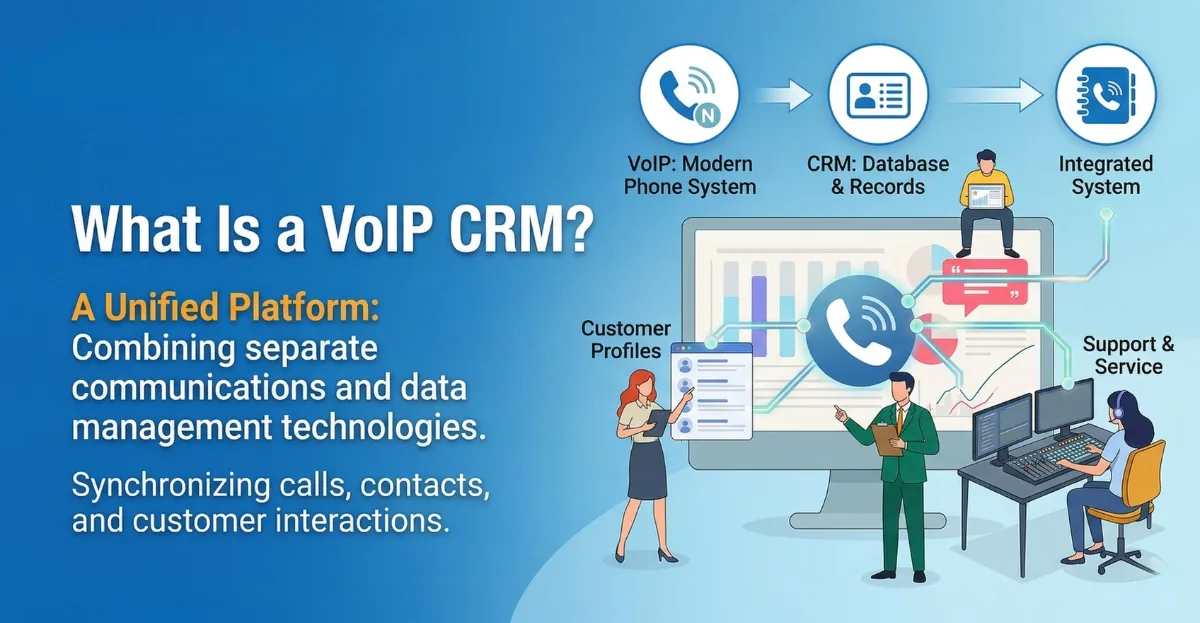
What Is a VoIP CRM?
A VoIP CRM combines two technologies that most businesses already use separately — a CRM for managing contacts, deals, and customer data, and a VoIP phone system for making and receiving business calls over the internet.
When these two systems are integrated, every phone interaction becomes a data point inside your CRM. A call comes in — the contact record opens automatically. Your rep talks to a lead — the call duration, recording, and AI-generated notes are saved to that contact without anyone typing anything. A deal moves forward — the next follow-up task is created automatically based on the call outcome.
The difference between running these systems separately and running them integrated is the difference between a team that is always catching up on admin and a team that is always selling.
No. A CRM manages customer data, deals, and communication history. VoIP is a phone technology that routes calls over the internet instead of traditional phone lines. A VoIP CRM integration connects them — so calls made through your VoIP system are automatically logged, recorded, and linked to the right contact inside your CRM.
VoIP CRM vs. Traditional CRM: What’s the Difference?
Most businesses start with a traditional CRM — a system where your team manually logs calls, writes notes, and updates contact records after each interaction. It works, but it creates a persistent data quality problem: the information in your CRM is only as accurate and complete as your team’s willingness to update it after every call.
A VoIP CRM integration changes that dynamic entirely.
| Factor | Traditional CRM (no VoIP) | VoIP CRM Integration |
|---|---|---|
| Call logging | Manual — done after the call | Automatic — logged in real time |
| Call recording | Separate tool required | Built-in, linked to contact record |
| Follow-up creation | Manual — rep creates task | Triggered automatically by call outcome |
| Contact screen pop | Not available | Contact record opens on inbound call |
| Call analytics | Not available or limited | Full reporting — duration, volume, outcomes |
| Data accuracy | Depends on rep discipline | Consistent — system-generated |
| Manager visibility | Low — based on rep reporting | High — real-time call data and recordings |
The impact on sales performance is direct. When reps spend less time on admin and more time on conversations — and when managers have real data to coach from — close rates improve, follow-up consistency improves, and customer experience improves.
According to Salesforce State of Sales research, sales reps spend only 28% of their week actually selling — the rest goes to administrative tasks, data entry, and tool-switching. A VoIP CRM integration directly addresses that imbalance.
How VoIP CRM Integration Actually Works
Understanding the mechanics helps you evaluate whether a given integration is deep or superficial — a distinction that matters enormously in practice.
At the basic level, VoIP CRM integration works through an API connection between your phone system and your CRM. When a call event happens — inbound, outbound, missed, completed — the VoIP system sends data to the CRM, which creates or updates the relevant record.
At a deeper level, a well-built VoIP CRM integration does the following:
- Screen pop on inbound calls — when a known contact calls, their CRM record opens on the rep’s screen before the call is answered. No scrambling for context. No starting blind.
- Click-to-dial from CRM records — reps initiate calls directly from the contact or deal record with a single click, eliminating manual dialing and the tab-switching that breaks focus
- Automatic call logging — call direction, duration, timestamp, and outcome are written to the CRM record immediately after the call ends, without rep input
- Call recording and transcription — recordings are stored against the contact record; AI transcription surfaces key topics, objections, and action items from the conversation
- Outcome-triggered workflows — when a rep marks a call as “interested” or “send proposal,” an automated follow-up sequence fires — email, task, or next call scheduled
- Real-time call analytics — managers see call volume, talk time, conversion rates by rep, and call outcome breakdowns without building manual reports
The depth of integration varies significantly between providers. Some VoIP CRM tools deliver all of the above natively. Others require third-party connectors like Zapier that introduce latency, data gaps, and additional points of failure. This distinction is one of the most important factors when evaluating your options.
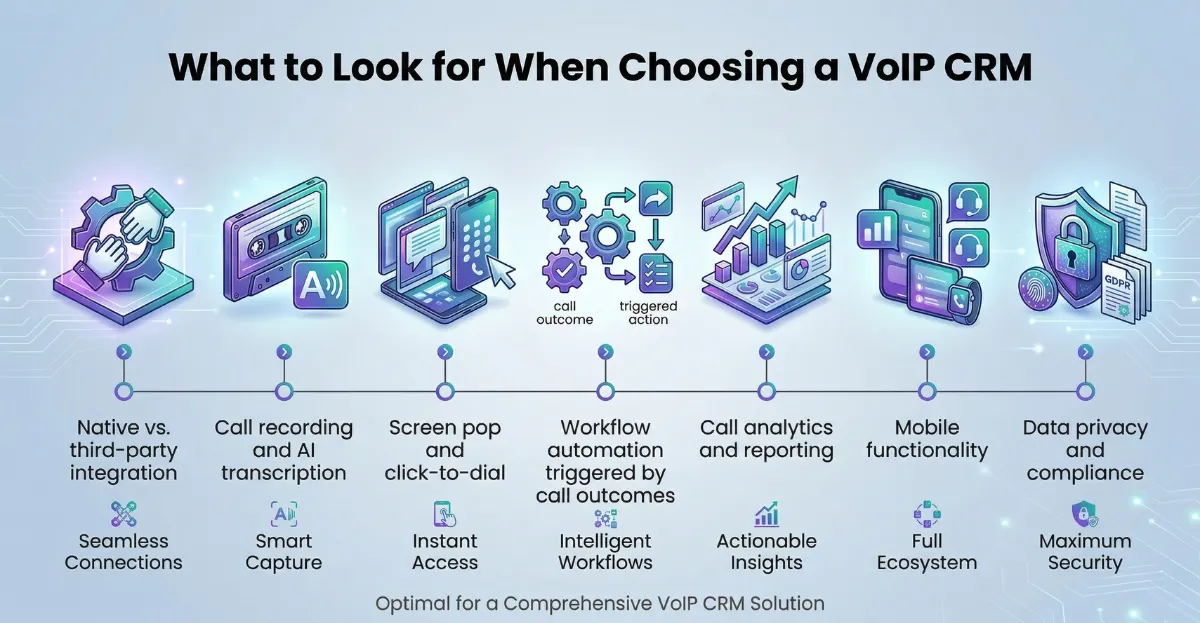
What to Look for When Choosing a VoIP CRM
Not all VoIP CRM integrations are built equally. Here are the factors that separate solutions that genuinely transform your sales operation from those that just add another tool to manage.
1. Native vs. third-party integration
A native integration is built and maintained by either the CRM vendor or the VoIP provider specifically for each other’s platform. It is deeper, more reliable, and requires no middleware. A third-party integration uses a connector like Zapier or Make to bridge the two systems — workable, but more fragile and often limited in what data it can pass.
When evaluating, ask specifically: is this a native integration or a connector? How many data fields sync? Does it support two-way sync?
2. Call recording and AI transcription
Recording capability is table stakes. AI transcription is where the real value is in 2026. Systems that automatically transcribe calls, identify key topics, flag competitor mentions, and surface objections give sales managers coaching data that would otherwise require hours of manual call review. Ask whether transcription is built in or requires a third-party add-on — and whether the transcription quality is adequate for your industry’s terminology.
3. Screen pop and click-to-dial
These two features are the daily-use proof points that determine whether your team actually uses the integration or routes around it. If screen pop requires a browser extension that breaks on every Chrome update, or if click-to-dial adds two extra steps versus just picking up the phone, adoption will be low regardless of what the feature list says. Test both features with your actual team before committing.
4. Workflow automation triggered by call outcomes
The highest-value VoIP CRM integrations do not just log calls — they act on call outcomes. When a rep marks a call as “voicemail left,” an automated SMS follow-up should fire. When they mark it “interested,” a proposal email sequence should start. This requires your VoIP CRM to connect to your automation layer — either natively or via a workflow tool like n8n workflow automation.
5. Call analytics and reporting
Manager visibility is what transforms individual call data into team performance insights. Look for: call volume by rep, average talk time, call outcome distribution, conversion rate by call type, and time-of-day performance data. If the reporting requires manual export to a spreadsheet, it will not get used consistently.
6. Mobile functionality
For businesses in Canada and the US with field-based or remote teams, mobile VoIP CRM functionality is not optional. Confirm that the mobile app supports click-to-dial, contact screen pop, and call logging — not just read-only CRM access. Some platforms significantly limit their mobile integration depth compared to desktop.
7. Data privacy and compliance
Call recording has legal requirements that vary by US state and Canadian province. In many jurisdictions, at least one party must consent to recording. In others, all parties must be notified. Your VoIP CRM must support configurable recording consent notifications, and your data storage must comply with applicable regulations — particularly important for healthcare, financial services, and legal sectors.
Top VoIP CRM Tools Worth Considering in 2026
| Platform | VoIP integration type | AI transcription | Automation | Best for |
|---|---|---|---|---|
| HubSpot + Aircall | Native | Yes | Strong | B2B sales teams, inbound-focused |
| Salesforce + RingCentral | Native | Yes | Very strong | Enterprise teams, complex sales cycles |
| Go High Level | Built-in VoIP | Yes (AI Employee) | Very strong | Agencies, service businesses, all-in-one |
| Zoho CRM + Twilio | Native + API | Via add-on | Strong | SMBs wanting flexibility and low cost |
| Pipedrive + JustCall | Native | Yes | Medium | Small sales teams, simple pipelines |
| Close CRM | Built-in VoIP | Yes | Strong | Inside sales teams, high call volume |
For businesses that want a single platform with VoIP built in rather than integrated, Go High Level and Close CRM both include native calling, recording, and AI features without requiring a separate phone system subscription.
For businesses already committed to a specific CRM, native integrations with Aircall, JustCall, or RingCentral consistently deliver the deepest feature sets and most reliable data sync.
Real Business Use Cases and ROI
Real estate agencies — Inbound enquiries arrive from multiple channels simultaneously. A VoIP CRM screens incoming calls, surfaces the lead’s property preferences and prior conversation history before the agent answers, and automatically logs every interaction to the deal record. Follow-up sequences fire based on call outcome. Agents spend time on conversations, not admin.
Insurance brokerages — High-volume outbound calling teams use VoIP CRM to power predictive dialing sequences from CRM lead lists, log disposition codes after every call, and trigger quote follow-up workflows automatically. Compliance recording meets regulatory requirements without manual processes.
Home services companies — Inbound call volume peaks unpredictably. VoIP CRM routes calls to available reps, pops the caller’s service history on screen, and schedules the next service appointment directly from the CRM during the call. Missed calls trigger automatic SMS callbacks within 60 seconds.
B2B sales teams — SDRs run outbound sequences combining email, LinkedIn, and phone calls from a single CRM workflow. Call outcomes update sequence steps automatically. Managers review AI call summaries for coaching without listening to every recording.
According to McKinsey’s research on sales productivity, organizations that integrate their communication and CRM systems see measurably higher sales productivity and pipeline visibility than those running disconnected tools.
How to Integrate VoIP Into Your CRM
- Audit your current call workflow — document where calls are coming from, how they are currently logged, and where data is falling through the cracks. This defines what your integration must solve.
- Choose your integration approach — native integration (best), API-based connector (reliable if well-maintained), or workflow automation bridge via n8n or Zapier (flexible but requires maintenance).
- Map the data fields — decide exactly which call data maps to which CRM fields. Call duration, outcome, recording URL, transcript, rep name, contact record — document this before setup begins.
- Configure call recording and consent — set up compliant recording notifications for your jurisdiction. In the US, check state-by-state one-party vs. all-party consent requirements. In Canada, confirm provincial requirements.
- Build outcome-triggered workflows — define what happens after each call outcome: voicemail left, connected but not interested, connected and interested, no answer. Each outcome should trigger an automatic next step.
- Train your team on screen pop and click-to-dial — adoption is the difference between a VoIP CRM that transforms your operation and one that collects dust. Run live sessions, not just documentation.
- Set up reporting dashboards — configure the call analytics views your managers will actually check daily: call volume by rep, outcome distribution, talk time, and conversion rate.
For businesses that want this entire setup handled correctly from day one — integration architecture, workflow automation, team training, and compliance configuration — working with a specialist like Exotica AI Solutions compresses weeks of trial-and-error into a fully operational system within days.
Frequently Asked Questions
Choosing the right VoIP CRM is not a technology decision — it is an operational decision. The businesses that get it right are not the ones with the most features enabled. They are the ones that mapped their actual call workflow, matched the integration depth to their sales process, and made sure their team adopted it properly from day one.
A VoIP CRM that your team actually uses consistently delivers more value than a sophisticated system that gets routed around because it adds friction. Start with the use case, choose the integration depth that serves it, and build the automation layer that makes every call count.
Ready to connect your phone system and CRM the right way? Talk to the Exotica AI Solutions team today.

Mohit Thakur is an experienced Digital Marketing Expert, SEO Team Leader, and Content Writer with over 6 years of expertise in search engine optimization, content strategy, and digital growth. He specializes in research-driven SEO and crafting high-quality, compelling content that helps businesses improve their online visibility, organic traffic, and lead generation.
With hands-on experience across multiple industries, Mohit focuses on creating user-focused, well-researched content aligned with the latest Google algorithms and AI search trends. His approach combines technical SEO, content writing, content optimization, and data analysis to deliver consistent and measurable results.