Quick Answer — How to automate lead generation with n8n:
- 1. Set up a Webhook or form trigger to capture incoming leads.
- 2. Use an HTTP Request node to enrich data via Clearbit or Apollo.io.
- 3. Add an AI node (OpenAI/Claude) to score and qualify each lead.
- 4. Route qualified leads to HubSpot or Salesforce via a native n8n node.
- 5. Notify your sales rep via Slack with enriched lead details in real time.
The entire process — from capture to CRM — completes in under 30 seconds with zero manual effort.
Every sales team knows the problem: hours spent copy-pasting contact details from LinkedIn into a spreadsheet, then handing it off to a CRM that still needs manual follow-up. That cycle is expensive, slow, and avoidable. In 2026, businesses relying on manual prospecting are leaving significant revenue on the table.
n8n — the open-source workflow automation platform — has become one of the most powerful tools for building an automated lead generation system without custom code. Whether you are a solo founder, a marketing operations manager, or a RevOps team at a scaling startup, n8n lets you connect your entire lead gen stack — from data capture to CRM enrichment — inside a single visual workflow.
This guide covers exactly how to build an n8n lead generation workflow step by step, which tools to connect, and how to make the system run 24/7 so your team focuses on closing, not collecting.
What Is n8n and Why Does It Work for Lead Generation Automation?
n8n (pronounced “n-eight-n”) is a fair-code workflow automation tool that connects apps, APIs, and databases through a node-based visual editor. Unlike fully hosted SaaS platforms, n8n can be self-hosted — giving businesses complete data control over their prospect information.
For lead generation automation specifically, n8n has three distinct advantages over competing lead gen software:
- No per-contact pricing: Most lead generation platforms charge per enrichment call or per contact processed. With n8n, costs scale with infrastructure rather than volume, making it far more economical at scale.
- Native integrations with the full stack: n8n connects directly to LinkedIn, Apollo.io, Hunter.io, Clearbit, HubSpot, Salesforce, Pipedrive, Slack, Google Sheets, Airtable, and hundreds of tools in a modern lead gen stack.
- Conditional logic and AI nodes:Smart workflows can qualify leads automatically using AI scoring, route them to the right sales rep, or trigger personalized outreach sequences — all without a developer.
According to Forrester Research, companies with mature lead management processes generate 50% more sales-ready leads at 33% lower cost. n8n provides the infrastructure to reach that maturity without enterprise software spend.
n8n is not a replacement for your CRM or outreach platform. It is the automation layer that makes all of them work together as one lead generation system.
Core Components of an n8n Lead Generation Workflow
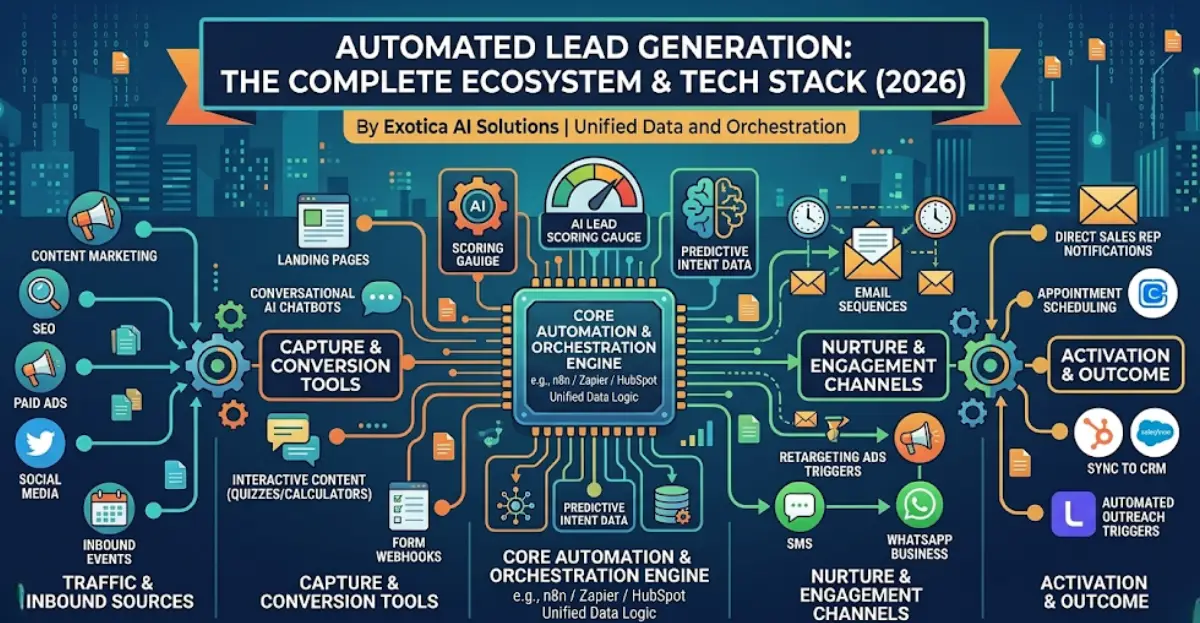
Before building, it helps to understand the four stages every automated lead generation system needs:
1. Lead Capture
This is where raw prospect data enters the pipeline. Common sources include:
- Web forms via Typeform, Webflow, or native HTML forms using webhooks
- LinkedIn Sales Navigator exports or browser-based scraping via Phantombuster
- Inbound gated content downloads and webinar signups
- Third-party intent data providers sending leads via API
n8n handles all of these through webhook triggers, scheduled HTTP requests, or direct app integrations. One trigger node listens for new form submissions and immediately kicks off everything downstream.
2. Lead Enrichment
Raw contact data — typically just a name, email, and company — is rarely enough to qualify a lead. n8n connects to enrichment APIs including Clearbit, Apollo.io, and Hunter.io to automatically append:
- Job title and seniority level
- Company size, industry, and revenue range
- LinkedIn profile URL
- Technology stack (for SaaS-focused targeting)
Enrichment happens inside the workflow itself. When a lead is captured, n8n fires parallel API calls, merges the responses, and passes the enriched record downstream — all within seconds.
3. Lead Qualification and AI Scoring
Not every inbound contact is a good fit. An effective n8n lead generation workflow uses conditional nodes to score leads against predefined criteria:
- Does the company have more than 50 employees?
- Is the contact in a decision-making role — VP, Director, or C-Suite?
- Does the email domain match a target account list?
You can layer an AI node here — calling an LLM via the n8n AI Agent or OpenAI node — to evaluate free-text fields such as job descriptions or inbound messages and return a qualification score. This is where n8n for lead generation starts to behave like an intelligent SDR.
4. CRM Sync and Outreach Triggering
Once enriched and qualified, n8n pushes the record to your CRM, creates a contact or deal record, assigns it to the right sales owner, and optionally triggers an outreach sequence in tools like Instantly, Smartlead, or Lemlist — or sends a Slack notification to the assigned rep.
The entire process from form submission to CRM record creation with full enriched data takes under 30 seconds.
Step-by-Step: How to Build an n8n Lead Generation Workflow
Here is a practical walkthrough: a lead fills out a Typeform, gets enriched via Clearbit, scored by an AI node, and pushed to HubSpot.
Step 1 — Set Up Your Trigger Node
Open a new workflow in n8n and add a Webhook trigger node. Copy the webhook URL and paste it into your Typeform Response Destination settings. Every new Typeform submission now automatically starts the workflow.
Step 2 — Enrich the Lead Data
Add an HTTP Request node pointing to the Clearbit Enrichment API. Pass the email address from the Typeform response as a query parameter. Map the returned fields — job title, company size, LinkedIn URL — to new output variables for use downstream.
Step 3 — Score the Lead with AI
Add an OpenAI node or use n8n’s built-in AI Agent node. Write a prompt that includes the enriched lead data and instructs the model to return a qualification score from 1 to 10 with a short reasoning note. Parse the JSON response and store the score as a workflow variable.
Step 4 — Branch on Score
Add an “If” node: leads scoring 7 or above route to HubSpot. Leads below 7 route to a Google Sheets node that logs them into a nurture sequence for future follow-up.
Step 5 — Create the CRM Record
The HubSpot node creates a new contact, assigns the deal stage to New Prospect, and sets the lead owner based on territory or round-robin logic using a Switch node.
Step 6 — Notify the Sales Rep
A Slack node sends a DM to the assigned rep with name, company, AI score, LinkedIn URL, and a direct link to the CRM record. The rep sees a qualified, enriched lead before they even open their CRM.
Advanced n8n Lead Generation Automation Strategies
LinkedIn Outreach Automation
Using Phantombuster or LinkedHelper connected via n8n’s HTTP Request node, you can automate LinkedIn connection requests and follow-up messages. n8n acts as the orchestration layer — triggering outreach after a lead passes qualification, throttling requests to stay within LinkedIn’s rate limits, and logging responses back to the CRM.
Competitor Intent Monitoring
Build a scheduled workflow that checks G2, Capterra, or Trustpilot for new reviews mentioning your competitors. Extract the reviewer’s company, enrich via Apollo, and add them to a targeted outreach list. These prospects are already evaluating solutions — they are among the highest-intent leads available without paid advertising.
Event-Triggered Sequences
Connect n8n to your product analytics platform. When a free-trial user hits a usage threshold — for example, exporting three reports — trigger a personalized upgrade email sequence. This bridges product-led growth and sales-assisted conversion entirely through automation.
AI-Powered Lead Research
Build an n8n workflow that takes a target company’s domain, queries a web search API, pulls their latest press releases and funding news, and uses an LLM to generate a personalized account brief for the sales rep. This approach cuts per-account research time from 30 minutes to under two minutes, and scales to hundreds of accounts per day.
Choosing the Right Lead Gen Software Stack for n8n
n8n is the automation engine, not the data source. Here is how a well-structured lead generation system looks with n8n at the center:
| Function | Recommended Tools | n8n Integration |
|---|---|---|
| Lead Capture | Typeform, Webflow, Instapage | Native node / Webhook |
| Enrichment | Clearbit, Apollo.io, Hunter.io | HTTP Request node |
| AI Scoring | OpenAI, Claude, Mistral | AI Agent / HTTP node |
| CRM Sync | HubSpot, Salesforce, Pipedrive | Native node |
| Outreach | Instantly, Lemlist, Smartlead | HTTP Request / API |
| Notification | Slack, MS Teams, Email | Native node |
| Intent Data | G2, Bombora, Apollo Intent | HTTP Request node |
Frequently Asked Questions
Final Thoughts: Build a Lead Generation System That Runs While You Sleep
The gap between companies with consistent pipeline and those without usually comes down to one thing: whether their lead generation system runs automatically or depends on manual work. Businesses that build n8n lead generation automation compound that advantage every week, every quarter.
n8n lead generation automation is not a shortcut — it requires clear thinking about your ICP, your qualification criteria, and clean CRM hygiene. But once those foundations are in place, you have an automated system that executes at scale around the clock.
Start with the trigger and CRM push in week one. Add enrichment in week two. Layer in AI scoring in week three. Within a month, your pipeline is running automatically — and your sales team can focus entirely on closing.

Mohit Thakur is an experienced Digital Marketing Expert, SEO Team Leader, and Content Writer with over 6 years of expertise in search engine optimization, content strategy, and digital growth. He specializes in research-driven SEO and crafting high-quality, compelling content that helps businesses improve their online visibility, organic traffic, and lead generation.
With hands-on experience across multiple industries, Mohit focuses on creating user-focused, well-researched content aligned with the latest Google algorithms and AI search trends. His approach combines technical SEO, content writing, content optimization, and data analysis to deliver consistent and measurable results.