What Is AI Automation?
AI automation uses artificial intelligence to handle business tasks that once needed a person’s judgment, then links those tasks into one workflow that runs on its own. It goes beyond classic rule-based automation because it can read messy text, make a decision, write a response, and choose the next step — all without a fixed script. A support ticket comes in, the system reads it, scores the urgency, drafts a reply, and either sends it or hands it to a person. That is AI automation in practice: intelligence sitting between the trigger and the action, turning scattered tools into one connected process.
Key Takeaways
- AI automation pairs artificial intelligence with software automation to handle tasks that fixed, rule-based systems cannot.
- Every AI automation follows the same pattern — trigger, AI reasoning, action — no matter how simple or complex the workflow.
- Most businesses already use AI somewhere, but very few have turned it into a connected system that runs without daily oversight.
- The biggest wins come from unstructured work — free-text emails, tickets, invoices — where keyword rules fail and judgment used to be required.
- Start with one process that runs often and needs a human to read messy input. Prove it works. Then expand.
Your team is probably already using AI somewhere. A chatbot answering basic questions. ChatGPT drafting an email here and there. But these are isolated moments, not a system. The output sits in one tool and a person still has to carry it to the next step.
AI automation closes that gap. It connects the AI to the rest of your workflow — your CRM, your inbox, your support desk — so the decision and the action happen in the same motion. No copy-pasting. No manual handoff.
At Exotica IT Solutions, we build these systems for businesses across Canada and the US — turning one-off AI experiments into automation that actually runs every day through our Intelligent Automation Services.
How AI Automation Works: Trigger, Reasoning, Action
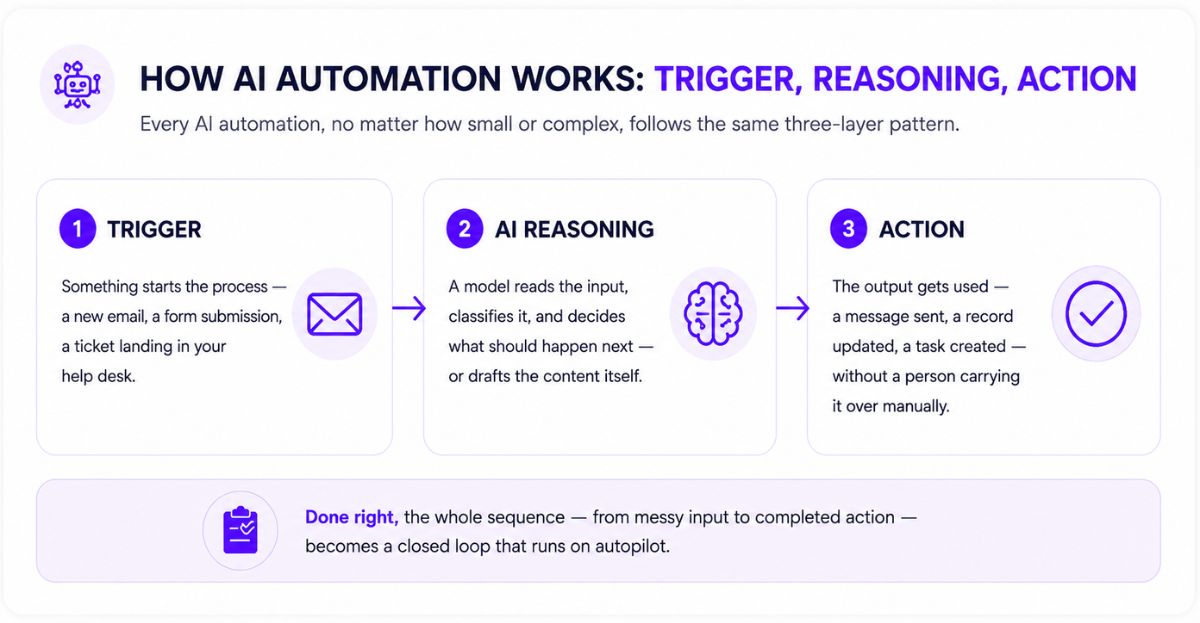
Every AI automation, no matter how small or complex, follows the same three-layer pattern.
- ▸The trigger. Something starts the process — a new email, a form submission, a ticket landing in your help desk.
- ▸The AI reasoning layer. A model reads the input, classifies it, and decides what should happen next — or drafts the content itself.
- ▸The action. The output gets used — a message sent, a record updated, a task created — without a person carrying it over manually.
Take a support ticket as an example. Rule-based automation can only route it by keyword. AI automation reads the full message, picks up the account and the urgency, drafts a reply in your brand voice, and decides whether to send it, escalate it, or trigger a refund. The trigger stays the same. What changed is the thinking in the middle — often handled through an AI Chatbot layer sitting in front of your support queue.
Industry Data
According to McKinsey’s 2025 State of AI survey, 88% of organizations now use AI in at least one business function — but only around 6% qualify as high performers seeing a real impact on profit. Gartner projects that by 2028, at least 15% of everyday business decisions will be made autonomously through agentic AI systems. The gap between adoption and actual results is exactly where a properly built AI automation system pays off.
This shift matters most where work involves unstructured data — free-text messages and judgment calls that historically needed a person. Our CRM Setup and Integration work shows how this plays out once AI automation starts feeding clean data straight into your sales pipeline.
AI Automation vs RPA vs Agentic Automation
AI automation sits inside a wider family of approaches. The difference between them comes down to two things: how much intelligence is involved, and how much freedom the system has to act on its own.
| Approach | Uses AI? | Best For |
|---|---|---|
| Robotic Process Automation (RPA) | No | Repetitive, screen-based tasks in legacy apps |
| Business Process Automation (BPA) | Optional | Invoicing, onboarding, approvals |
| Intelligent Automation | Yes | Document processing, claims handling |
| AI Automation | Yes | Content, support, ops with messy inputs |
| Agentic Automation | Yes | Multi-step workflows needing judgment at every turn |
For most businesses today, the real choice sits between AI automation and agentic automation. Both can run on the same underlying platforms, including setups built through n8n workflow automation. The difference is whether the AI just executes the steps you’ve defined, or decides which steps to take on its own. Our IT Services page covers how this fits into a broader IT consulting roadmap for growing teams.
How to Build an AI Automation — Step by Step
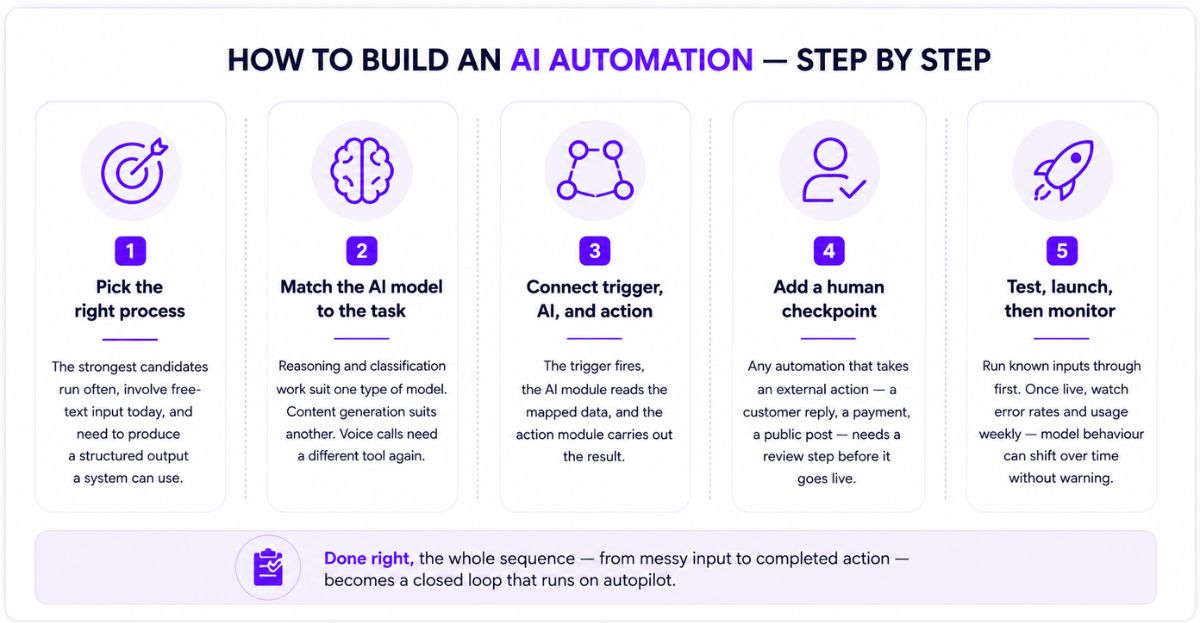
Every working AI automation gets built the same way, regardless of industry.
- ▸Step 1 — Pick the right process. The strongest candidates run often, involve free-text input today, and need to produce a structured output a system can use.
- ▸Step 2 — Match the AI model to the task. Reasoning and classification work suit one type of model. Content generation suits another. Voice calls need a different tool again — this is where an AI Calling Agent often fits.
- ▸Step 3 — Connect trigger, AI, and action. The trigger fires, the AI module reads the mapped data, and the action module carries out the result.
- ▸Step 4 — Add a human checkpoint. Any automation that takes an external action — a customer reply, a payment, a public post — needs a review step before it goes live.
- ▸Step 5 — Test, launch, then monitor. Run known inputs through first. Once live, watch error rates and usage weekly — model behaviour can shift over time without warning.
Done right, the whole sequence — from messy input to completed action — runs in minutes, with a person only stepping in when it actually matters.
Real-World Example: Toronto-Based Logistics Provider
A logistics company in the Greater Toronto Area was losing hours each day to manual invoice processing — reading supplier emails, pulling line items, and entering them into accounting software by hand.
After deploying an AI automation that reads incoming invoices, extracts vendor and line-item data, and writes it directly into their accounting system, processing time per invoice dropped from roughly 15 minutes to under two. Flagged anomalies — duplicate charges, mismatched totals — now route straight to the finance lead instead of sitting unnoticed in a shared inbox.
Key Factors to Consider Before You Automate
1. Process Fit
Run this quick test: does the process happen at least 10 times a week, does it need someone to read unstructured input today, and does it produce an output another system can use? If two of three are missing, automate it with simple rules first — AI automation is overkill for that case.
2. Data Quality
An AI model is only as reliable as the data flowing into it. Duplicate CRM records or inconsistent form fields will not get fixed by automation — they get amplified by it.
3. Tool and Model Choice
No single AI model handles every task well. Reasoning and classification work suit one type of model, content generation another, and voice or phone-based work a different tool entirely. Chaining two or three tools in one workflow is normal and often the strongest setup.
4. Privacy and Compliance
Canadian businesses processing customer data through AI tools need to stay aligned with PIPEDA, and any automated email or SMS outreach needs to follow CASL consent rules. Quebec operations face the added requirements of Law 25. Build retention and access policies in from day one — not after a problem comes up.
5. Human Oversight
Fully autonomous works fine for low-risk, repetitive tasks. Anything touching a customer relationship, a payment, or sensitive data deserves a review checkpoint before the output goes live.
Cost, Timeline, and What to Expect
Pricing depends on how many tools you’re connecting and how custom the logic needs to be. Here’s a realistic range for Canadian small and mid-sized businesses.
| Project Type | What’s Included | Typical Timeline |
|---|---|---|
| Single-Task Automation | One trigger, one AI step, one action (e.g., ticket classification) | 1–2 weeks |
| Connected Workflow | 2–3 apps linked, AI reasoning plus human review step | 3–5 weeks |
| Multi-Department Rollout | Several workflows across sales, support, and finance | 6–10 weeks |
| Enterprise Deployment | Full monitoring, governance, security review, ongoing tuning | 3+ months |
What the Data Shows
According to IBM’s research on enterprise AI adoption, organizations running autonomous AI workflows saw close to a 40% drop in manual processing costs within the first year. Separately, industry forecasts suggest that by the end of 2026, around 40% of enterprise applications will include task-specific AI agents — up from under 5% in 2025. The pattern is consistent: most of the value shows up in time saved, not in the tool itself.
Track the hours your team spends on the task today before automating it. That number is your baseline for measuring whether the automation actually paid for itself.
Common AI Automation Mistakes to Avoid
- ▸Automating the wrong process first. Pick the task that’s high-volume and high-friction, not the one that’s easiest to demo.
- ▸Skipping the human checkpoint. Letting AI take external action with zero review invites errors that are hard to undo once a customer sees them.
- ▸Trusting messy data going in. Clean up duplicate records and inconsistent fields before the AI starts working with them.
- ▸No monitoring after launch. Models update silently and behaviour drifts. Check error rates and usage on a set schedule, not when something breaks.
- ▸Ignoring privacy rules. Sending customer data through AI tools without checking PIPEDA or CASL requirements creates risk that’s expensive to fix later.
- ▸Trying to automate everything at once. One well-built workflow beats five half-finished ones every time.
- Hire Exotica IT Solutions
Frequently Asked Questions: AI Automation
AI automation isn’t about chasing every new tool that launches. It’s about picking the one process costing your team the most hours, fixing it properly, and letting that result fund the next one. Our Case Studies page has more real examples of how this looks once it’s live. If you’re ready to move past pilots and into a system that actually runs, talk to us — we’ll map out exactly where to start.

About the Author
Mohit Thakur is a Digital Marketing Expert and SEO Team Leader at Exotica IT Solutions, with hands-on experience helping Canadian and US businesses move from one-off AI experiments to fully connected automation systems. Mohit focuses on translating practical AI workflows into measurable business outcomes for teams at every stage of adoption. Note: This content is for informational purposes only. Tool recommendations and figures referenced are general guidance accurate as of publication date and subject to change.
Last Updated: June 24, 2026
Sources:
McKinsey — The State of AI 2025 ·
Gartner — Agentic AI Predictions 2028 ·
IBM — Global AI Adoption Index ·
Office of the Privacy Commissioner of Canada — PIPEDA ·
CRTC — Canada’s Anti-Spam Legislation

Mohit Thakur is an experienced Digital Marketing Expert, SEO Team Leader, and Content Writer with over 6 years of expertise in search engine optimization, content strategy, and digital growth. He specializes in research-driven SEO and crafting high-quality, compelling content that helps businesses improve their online visibility, organic traffic, and lead generation.
With hands-on experience across multiple industries, Mohit focuses on creating user-focused, well-researched content aligned with the latest Google algorithms and AI search trends. His approach combines technical SEO, content writing, content optimization, and data analysis to deliver consistent and measurable results.