What does integrating marketing automation tools mean?
Integrating marketing automation tools means connecting your email platform, CRM, ad networks, chatbots, and customer communication systems into a single coordinated workflow — so every marketing action triggers the right follow-up automatically, every lead is tracked across every touchpoint, and your team spends time on strategy instead of manually moving data between disconnected platforms.
The result: higher conversion rates, faster response times, and a complete picture of every customer journey — without adding headcount.
Here is a scenario that plays out in thousands of businesses every week.
A lead fills out your contact form. Your email tool sends a welcome sequence. Your sales rep manually logs the conversation in the CRM — three days later. Your ad platform is still retargeting that lead with acquisition ads even though they already booked a call. Your chatbot has no idea the conversation happened.
Every tool in your stack is doing its job. None of them know what the others are doing. And the lead — who was warm on day one — has gone cold waiting for a coherent response from a business that looks, from the outside, like it has no idea who they are.
That is not a technology problem. It is an integration problem. And integrating marketing automation tools is exactly how you solve it.
This guide covers what marketing automation integration actually means in practice, how to build a marketing automation strategy around connected tools, which integrations deliver the highest ROI, and how to implement them without the six-month projects that most businesses dread.
Table of Contents
- What Is Marketing Automation Integration?
- Why Integration Is the Missing Layer in Most Marketing Automation Strategies
- The Core Marketing Automation Integrations That Drive ROI
- CRM Integration: The Foundation Everything Else Builds On
- How to Integrate Marketing Automation Tools: A Practical Framework
- B2B and Enterprise Marketing Automation Integration
- Marketing Automation Platform Comparison: What to Look for in Integration Depth
- Frequently Asked Questions
What Is Marketing Automation Integration?
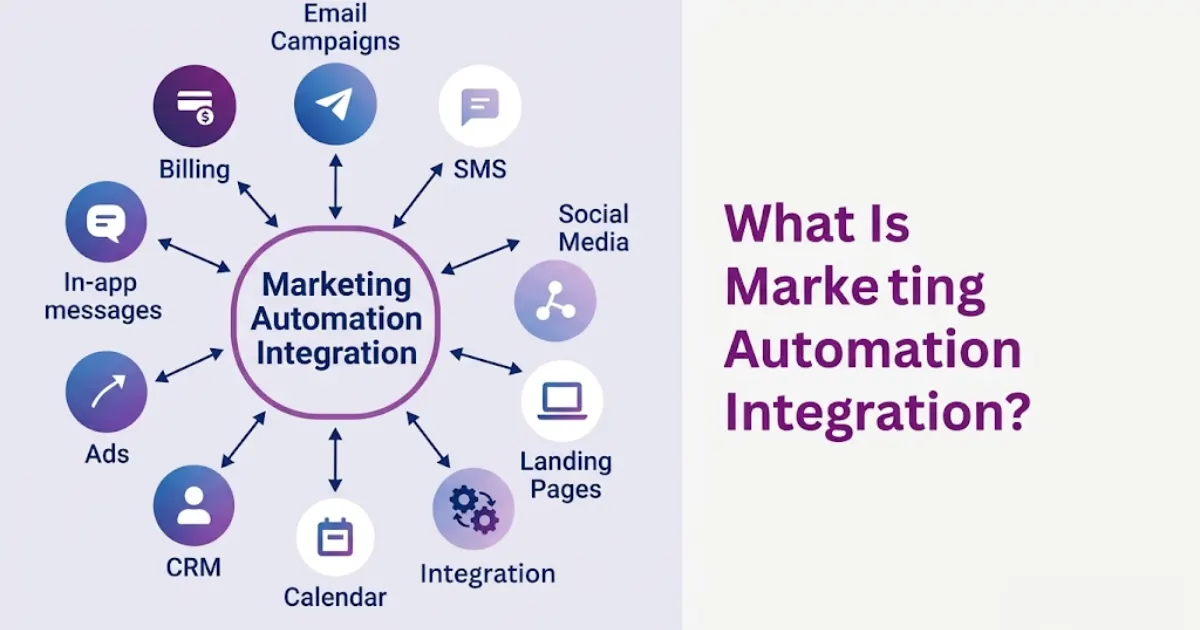
Marketing automation integration is the technical and strategic process of connecting your marketing, sales, and customer communication tools into a unified system where data flows automatically between platforms and every action in one system triggers the right response in another.
At the basic level, integration means your CRM knows when someone opens an email. At a mature level, it means your entire marketing process flow — from first ad impression to closed deal to post-purchase follow-up — runs as a single coordinated sequence, with every platform contributing to and receiving data from a shared customer record.
The distinction between having marketing automation tools and having integrated marketing automation tools is the difference between a collection of instruments and an orchestra. The instruments are the same. The integration is what makes music instead of noise.
What is marketing automation integration?
Marketing automation integration connects your email platform, CRM, advertising networks, chatbots, and customer communication systems so data flows automatically between them. When a lead takes an action in any connected tool — opens an email, clicks an ad, submits a form, books a call — every other platform updates automatically, triggering the right follow-up without manual data entry or cross-platform management.
Why Integration Is the Missing Layer in Most Marketing Automation Strategies
Most businesses have already invested in marketing automation. They have an email platform. They have a CRM. They have ad retargeting running. They have a chatbot on the website.
And most of those businesses are still not getting the ROI they expected — because each of those tools is running a separate, disconnected version of the customer relationship.
The core problem with unintegrated marketing automation is data fragmentation. Your email platform has one view of the contact. Your CRM has a different view. Your ad platform has a third. None of them agree on what stage the prospect is at, what they have already been told, or what the right next step should be.
The result is the experience that drives prospects away: the business that emails you about a product you already bought, the ad that retargets you after you became a customer, the chatbot that asks for your name when your rep spoke to you yesterday.
Marketing automation integration eliminates fragmentation by creating a single source of truth — a unified customer record that every platform reads from and writes to. Every interaction, regardless of channel, updates the same record. Every automated action is triggered by the same logic. Every team member sees the same customer history.
According to Salesforce State of Marketing research, high-performing marketing teams are 2.9x more likely to use marketing automation integrated with their CRM than underperformers. The integration is not a feature — it is the infrastructure that makes automation perform.
The Core Marketing Automation Integrations That Drive ROI
CRM and email marketing integration
The most foundational integration in any marketing automation implementation is connecting your CRM to your email platform. When these two systems share data in real time, email sequences can be triggered by CRM stage changes, email engagement data can update lead scores in the CRM, and sales reps can see the full email history alongside their call notes — in one place.
The practical result: a lead who opens your pricing email three times in 48 hours gets automatically escalated to high priority in the CRM and triggers an immediate sales task — without anyone manually reviewing email analytics.
CRM and advertising platform integration
Integrating advertising platforms with CRM systems is one of the highest-ROI marketing automation integrations available to mid-market and enterprise businesses. When your CRM and ad platforms are connected, you can suppress active customers from acquisition campaigns, create lookalike audiences from your highest-value accounts, and automatically pause retargeting for leads who have already converted.
The cost savings from eliminating wasted ad spend on existing customers alone frequently exceed the cost of the integration in the first month of operation.
CRM and call center integration
CRM call center integration connects your customer communication infrastructure — inbound call routing, outbound dialing, call recording, and agent notes — directly to your CRM record. When a contact calls, their full history pops on screen before the agent answers. Every call is logged automatically. Follow-up tasks are created based on call outcome. No manual data entry required.
Our VoIP CRM guide covers this integration architecture in full — including how to evaluate call center CRM solutions and which CRM call center software options deliver the deepest native integration.
CRM and chatbot integration
An AI chatbot that operates as a standalone tool collects conversation data that never reaches your CRM. An integrated chatbot writes every conversation, qualification answer, and captured contact detail directly to the CRM record — so when a lead moves from chatbot to human, the handoff is seamless and the context is complete.
Marketing automation and conversation insights integration
Integrating conversation insights with marketing automation means taking the signals from customer conversations — support tickets, chat transcripts, call summaries — and feeding them back into your marketing logic. A customer who repeatedly mentions a specific pain point in support interactions should be enrolled in an education sequence about that topic. A prospect who asks pricing questions in chat should trigger a sales follow-up workflow. Conversation data is among the most valuable but least-used signal in most marketing automation stacks.
CRM Integration: The Foundation Everything Else Builds On
Every marketing automation integration ultimately connects to your CRM — because your CRM is the system of record for your customer relationships. Without a well-configured, cleanly integrated CRM at the center of your marketing stack, every other integration operates on incomplete data.
The CRM integration architecture that supports mature marketing automation has three defining characteristics:
Bidirectional data sync. Data does not just flow from your marketing tools into the CRM — it flows back out. When a contact’s stage changes in the CRM, their email sequence updates. When they book a meeting, their ad targeting changes. When they become a customer, their onboarding sequence starts. A one-way integration is a data dump. A bidirectional integration is an operational nervous system.
Real-time event triggers. The value of marketing automation integration is immediacy. A lead who just opened your proposal needs to hear from you in minutes, not after your rep reviews yesterday’s email report. Real-time event triggers — built on webhooks or native API connections rather than scheduled data syncs — are what make automation feel responsive rather than lagged.
Contact-level granularity. Integrated marketing automation works at the individual contact level, not at segment level. Every email opened, every page visited, every call made, every form submitted is attributed to a specific contact record — enabling personalization and automation logic that is genuinely responsive to individual behavior rather than demographic assumptions.
For businesses evaluating how to build or restructure this foundation, our complete guide to CRM integration for modern businesses covers the full architecture — including VoIP integration, data model design, and the most common integration failures to avoid.
How to Integrate Marketing Automation Tools: A Practical Framework
The most common reason marketing automation integration projects take longer and cost more than expected is starting with tools rather than with process. The businesses that implement integration successfully start with the customer journey and work backward to the technical requirements.
Step 1: Map your current marketing process flow
Document every touchpoint from first awareness to closed customer to post-purchase retention. Identify where data currently lives, where it needs to go, and where the handoff currently breaks down. This marketing automation process flow map is your integration architecture specification before you touch a single API.
Step 2: Define your triggers and actions
For every step in your marketing process flow, define the trigger (what event initiates the next action) and the action (what should happen automatically when that event fires). Form submission → CRM record created + email sequence started. CRM stage change to Proposal Sent → email follow-up scheduled + retargeting audience updated. Call completed as “interested” → proposal email sent + calendar invite triggered.
This trigger-action mapping is what transforms a list of integration requirements into a working marketing automation strategy.
Step 3: Choose your integration method
- Native integrations — built-in connections between two platforms, typically the deepest and most reliable. HubSpot and Salesforce have native integrations with most major marketing tools. Native is always the first choice when available.
- API-based connectors — direct API connections built by your development team or a specialist, offering full flexibility and custom data mapping. Required for proprietary systems or integrations that native options do not support.
- Workflow automation bridges — platforms like n8n workflow automation connect tools that do not have native integrations, allowing you to build custom trigger-action logic between any combination of platforms without dedicated development resources.
Step 4: Set up your data model before you connect
The most expensive integration mistake is connecting tools before standardizing the data model. If your CRM uses “Company” and your email platform uses “Organization,” your sync will either fail or create duplicate records. Define your field mapping, contact deduplication logic, and data ownership rules before the first connection is live.
Step 5: Test with real scenarios, not test data
Run your five most common lead scenarios through the integrated stack before go-live: new inbound lead, returning contact, disqualified prospect, existing customer, and reactivation candidate. Real scenarios surface edge cases that test environments miss — duplicate record handling, edge cases in trigger logic, and timing issues in multi-step sequences.
Step 6: Monitor, measure, and optimize
Integrated marketing automation is not a set-and-forget system. Every integration point is a potential data gap. Build monitoring into your marketing automation implementation from day one — track sync error rates, monitor sequence enrollment volumes, and audit contact record completeness on a regular cadence.
For businesses that want this entire architecture built correctly from the start — CRM configuration, API integrations, workflow automation, and team training — working with a specialist like Exotica AI Solutions compresses a multi-month integration project into a structured, validated deployment.
B2B and Enterprise Marketing Automation Integration
B2B marketing automation and enterprise marketing automation introduce complexity that consumer-facing integrations do not — account-based marketing logic, multi-stakeholder buying journeys, longer sales cycles, and compliance requirements that constrain data handling.
At the B2B level, the most critical integrations are:
- Account-level CRM integration — contacts must be attributed to accounts, and marketing automation logic must operate at both the contact and account level simultaneously. An enterprise account with 12 active contacts should trigger account-level signals when engagement reaches a threshold, not just contact-level sequences for each individual.
- Sales intelligence integration — connecting intent data platforms, firmographic enrichment tools, and LinkedIn Sales Navigator to your CRM ensures your marketing automation operates on complete account intelligence rather than just form submission data.
- Contact center CRM integration — for B2B businesses with inside sales teams, the contact center CRM integration that logs every call, routes inbound enquiries, and creates follow-up tasks is the operational backbone of the entire marketing-to-sales handoff process.
- Enterprise CRM solution architecture — large organizations require marketing automation integration that supports role-based access, territory management, multi-brand or multi-region deployments, and compliance-grade audit logging of every automated action.
Marketing Automation Platform Comparison: What to Look for in Integration Depth
When evaluating marketing automation platforms, most businesses compare features. The more important evaluation criterion is integration depth — how cleanly and completely each platform connects to the rest of your stack.
| Platform | CRM integration | Ad platform integration | VoIP/Call center | Best for |
|---|---|---|---|---|
| HubSpot | Native (built-in CRM) | Strong — Google, Meta, LinkedIn | Native calling | SMB to mid-market, inbound-focused |
| Salesforce Marketing Cloud | Native (Salesforce CRM) | Very strong | Via partner ecosystem | Enterprise, complex journeys |
| ActiveCampaign | Strong — 870+ integrations | Medium | Via Zapier / API | SMB, email-first automation |
| Go High Level | Built-in CRM + VoIP | Strong | Built-in native | Agencies, service businesses |
| Marketo (Adobe) | Strong — Salesforce, MS Dynamics | Very strong | Via partner ecosystem | Enterprise B2B, account-based |
| n8n + Custom stack | Fully custom | Fully custom | Fully custom | Maximum flexibility, any stack |
For businesses already committed to a specific CRM, the platform with the deepest native integration to that CRM will almost always outperform a platform with more features but weaker integration. A feature-rich platform that requires three middleware layers to sync with your CRM will underperform a simpler platform that integrates natively.
Frequently Asked Questions
Conclusion
Integrating marketing automation tools is not a technology project. It is the operational infrastructure decision that determines whether your marketing stack generates compounding returns or remains a collection of expensive tools that do not talk to each other.
The businesses generating the strongest marketing ROI in 2026 are not those with the most sophisticated individual tools. They are those whose tools work as a system — where every customer interaction, regardless of channel, contributes to a unified record and triggers the right next action automatically.
Start with the process. Map the triggers and actions. Build the integrations that serve the journey. Then measure, optimize, and expand from there.
Ready to build a connected marketing automation stack?
Talk to the Exotica AI Solutions team today.
Related Reading
- CRM Integration Services
- Complete Guide to VoIP CRM Integration
- How to Choose a VoIP CRM for Your Business
- AI Chatbot Development
- n8n Workflow Automation
- Go High Level Setup & Automation

Mohit Thakur is an experienced Digital Marketing Expert, SEO Team Leader, and Content Writer with over 6 years of expertise in search engine optimization, content strategy, and digital growth. He specializes in research-driven SEO and crafting high-quality, compelling content that helps businesses improve their online visibility, organic traffic, and lead generation.
With hands-on experience across multiple industries, Mohit focuses on creating user-focused, well-researched content aligned with the latest Google algorithms and AI search trends. His approach combines technical SEO, content writing, content optimization, and data analysis to deliver consistent and measurable results.