Email remains one of the highest-performing digital marketing channels. However, the real impact does not come from occasional newsletters or promotional blasts. I’ve found that the biggest conversion improvements happen when businesses shift from manual campaigns to structured email automation.
Email automation allows you to deliver timely, relevant, and personalized messages based on user behavior. Instead of guessing what to send next, automated workflows guide prospects and customers through a consistent journey. When implemented correctly, these systems can significantly increase engagement, repeat purchases, and overall conversion rates.
According to research from the Data & Marketing Association, email continues to deliver strong returns compared to other digital channels. Automation amplifies that performance by ensuring every message is triggered at the right moment.
What Is Email Automation and How It Improves Conversions
Email automation is a system that sends emails automatically based on triggers such as:
- User sign-ups
- Purchases
- Browsing behavior
- Inactivity
- Milestones or dates
Over time, automation has evolved through three major phases.
Phase 1: Manual Campaigns
Businesses sent the same message to entire lists. This often led to:
- Low engagement
- Poor targeting
- High unsubscribe rates
Phase 2: Segmented Campaigns
Marketers began dividing audiences by:
- Interests
- Purchase history
- Demographics
This improved relevance but still required manual effort.
Phase 3: Behavior-Driven Automation
Modern automation responds instantly to user actions. This creates:
- Timely communication
- Personalized messaging
- Higher conversion rates
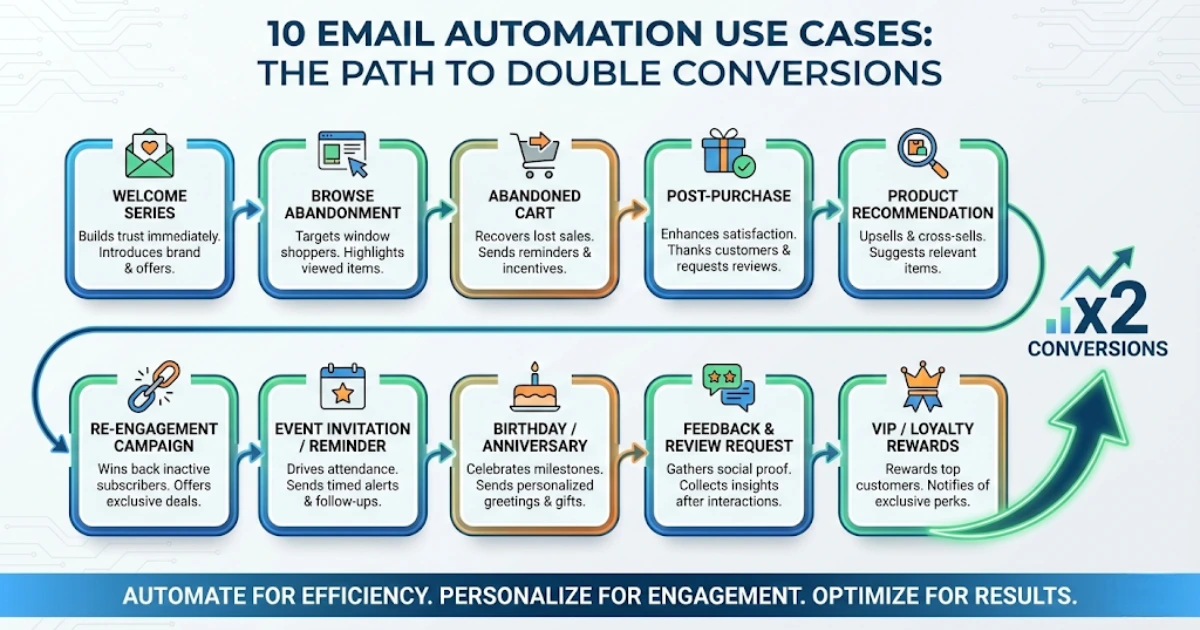
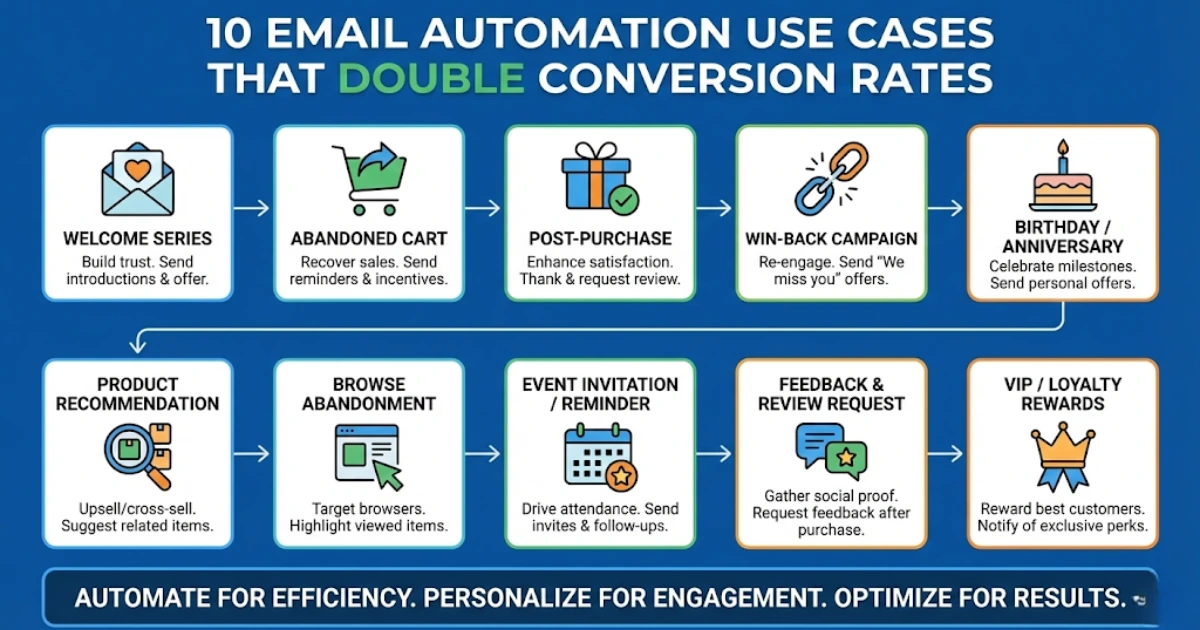
1. Welcome Email Series
A welcome sequence is the foundation of most automation strategies. It triggers when someone subscribes or creates an account.
Why it works
New subscribers are at peak interest. They expect immediate communication.
What to include
- Brand introduction
- Core benefits
- Top products or services
- A limited-time welcome offer
Conversion impact
Welcome emails often produce the highest open and click-through rates because they reach users when attention is strongest.
2. Abandoned Cart Recovery Emails
Cart abandonment is common in eCommerce. Automated reminders help recover lost revenue.
Typical workflow
- Reminder email within 1–2 hours
- Social proof or reviews after 24 hours
- Incentive or discount after 48–72 hours
Why it works
These emails target users who already showed buying intent.
3. Lead Nurturing Sequences
Not every lead is ready to buy immediately. Lead nurturing sequences guide prospects toward a decision.
Ideal for
- SaaS products
- B2B services
- High-ticket offers
- Educational programs
Content types
- Educational resources
- Case studies
- Comparisons
- Testimonials
This approach builds trust and shortens the sales cycle.
4. Post-Purchase Follow-Up Emails
The customer journey continues after the sale. Post-purchase emails help increase lifetime value.
Key email types
- Order confirmatio
- Shipping updates
- Product usage tips
- Cross-sell or upsell suggestions
Why it matters
Repeat customers tend to convert faster and spend more.
5. Re-Engagement Campaigns
Over time, some subscribers stop interacting with emails. Re-engagement campaigns bring them back.
Common triggers
- No opens for 60–90 days
- No purchases within a set period
- Dormant accounts
Effective messages
- “We miss you” emails
- Exclusive offers
- New product announcements
- Preference update requests
Reactivating existing contacts is often more cost-effective than acquiring new ones.
6. Behavior-Based Product Recommendations
These emails use browsing and purchase data to suggest relevant products.
Common triggers
- Recently viewed items
- Similar categories
- Past purchases
- Wishlist activity
Why it works
Personalized content increases relevance, which improves click-through and conversion rates.
7. Onboarding Email Sequences
Onboarding emails help new users understand how to use a product or service.
Typical sequence
- Welcome and setup instructions
- Core feature highlights
- Advanced tips
- Success stories or case studies
Good onboarding reduces churn and increases customer satisfaction.
8. Time-Sensitive Promotional Campaigns
Automation can trigger promotions based on timing or user behavior.
Examples
- Flash sales
- Seasonal promotions
- Limited-time offers
- Product launches
Why it works
Urgency encourages faster decision-making and higher conversions.
9. Birthday or Anniversary Emails
Milestone emails create a personal connection with customers.
Examples
- Birthday discounts
- Membership anniversaries
- First purchase anniversaries
These messages often achieve high open rates because they feel personal and unexpected.
10. Feedback and Review Requests
Automated feedback emails help collect insights and build social proof.
When to send
- After a purchase
- After delivery
- After a service interaction
What to include
- Quick rating options
- Short surveys
- Incentives for reviews
Positive reviews increase trust and influence future buyers.
Step-by-Step: How to Implement Email Automation
Step 1: Start with High-Impact Workflows
Focus on:
- Welcome series
- Abandoned cart emails
- Post-purchase follow-ups
These typically generate the fastest results.
Step 2: Segment Your Audience
Divide subscribers based on:
- Behavior
- Purchase history
- Engagement level
- Interests
Segmentation improves relevance and conversions.
Step 3: Create Personalized Content
Use:
- Customer names
- Product recommendations
- Behavioral triggers
Personalization makes emails feel more relevant.
Step 4: Test and Optimize
Regularly test:
- Subject lines
- Send times
- Layouts
- Calls to action
Small improvements can lead to major gains.
What to Avoid in Email Automation
- Sending too many emails in a short period
- Using generic, non-personalized messages
- Ignoring mobile optimization
- Failing to remove inactive subscribers
- Not testing workflows
Automation should enhance the user experience, not overwhelm it.
You’re Not Alone If Email Automation Feels Overwhelming
Many businesses hesitate to implement automation because it seems technical or complex. I understand how confusing it can feel at first. The idea of building workflows, triggers, and segments can appear intimidating.
In reality, most successful automation strategies start small. A simple welcome sequence or cart recovery flow can produce noticeable improvements within weeks. As you gain confidence, you can expand into more advanced automation.
When NOT to Rely Only on Automation
Automation is powerful, but some situations require direct human interaction.
Seek manual outreach when:
- A high-value client has a complaint
- A major deal requires negotiation
- A technical issue affects multiple customers
- A prospect shows strong buying signals
Personal communication can close deals more effectively in these scenarios.
Realistic Timeline for Results
First 1–2 Months
- Automation setup
- Improved open and click rates
- Early engagement gains
Months 3–6
- Increased repeat purchases
- Better lead quality
- Reduced cart abandonment
Months 6–12
- Higher customer lifetime value
- Stronger brand loyalty
- Consistent conversion growth
Ignoring automation may lead to:
- Missed revenue opportunities
- Lower engagement
- Higher acquisition costs
The Future of Email Automation
Email automation is becoming more intelligent with AI and predictive analytics.
Future developments include:
- AI-generated subject lines
- Predictive send-time optimization
- Real-time product recommendations
- Dynamic content personalization
Businesses that adopt automation early often gain a competitive advantage in conversion performance.
Frequently Asked Questions

Mohit Thakur is an experienced Digital Marketing Expert, SEO Team Leader, and Content Writer with over 6 years of expertise in search engine optimization, content strategy, and digital growth. He specializes in research-driven SEO and crafting high-quality, compelling content that helps businesses improve their online visibility, organic traffic, and lead generation.
With hands-on experience across multiple industries, Mohit focuses on creating user-focused, well-researched content aligned with the latest Google algorithms and AI search trends. His approach combines technical SEO, content writing, content optimization, and data analysis to deliver consistent and measurable results.